Chapter One of six

Retrieval Practice

The act of pulling knowledge out of memory does more for learning than putting it back in. This chapter is about making that effort happen, on purpose, again and again.

Rooted in the work of Bjork, Roediger & Karpicke, Agarwal, Dunlosky, Cepeda, Kornell, Rohrer, Ebbinghaus, Kapur, Metcalfe, Nestojko, Fiorella & Mayer, Slamecka & Graf and Godden & Baddeley

The act of retrieving knowledge is itself a learning event, not merely a test of what has been learned.

Roediger & Karpicke, 2006

24 strategies5 groupsabout 27 minutes to read

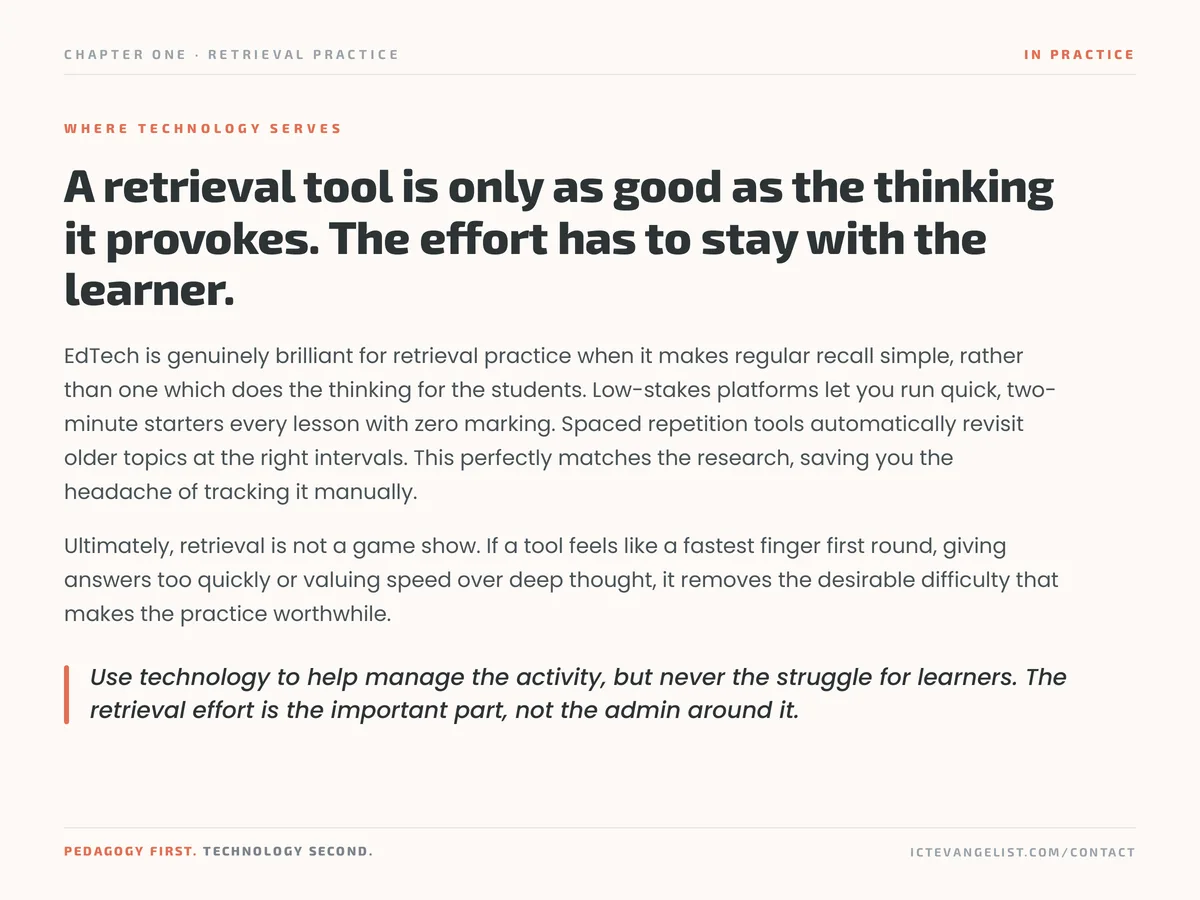
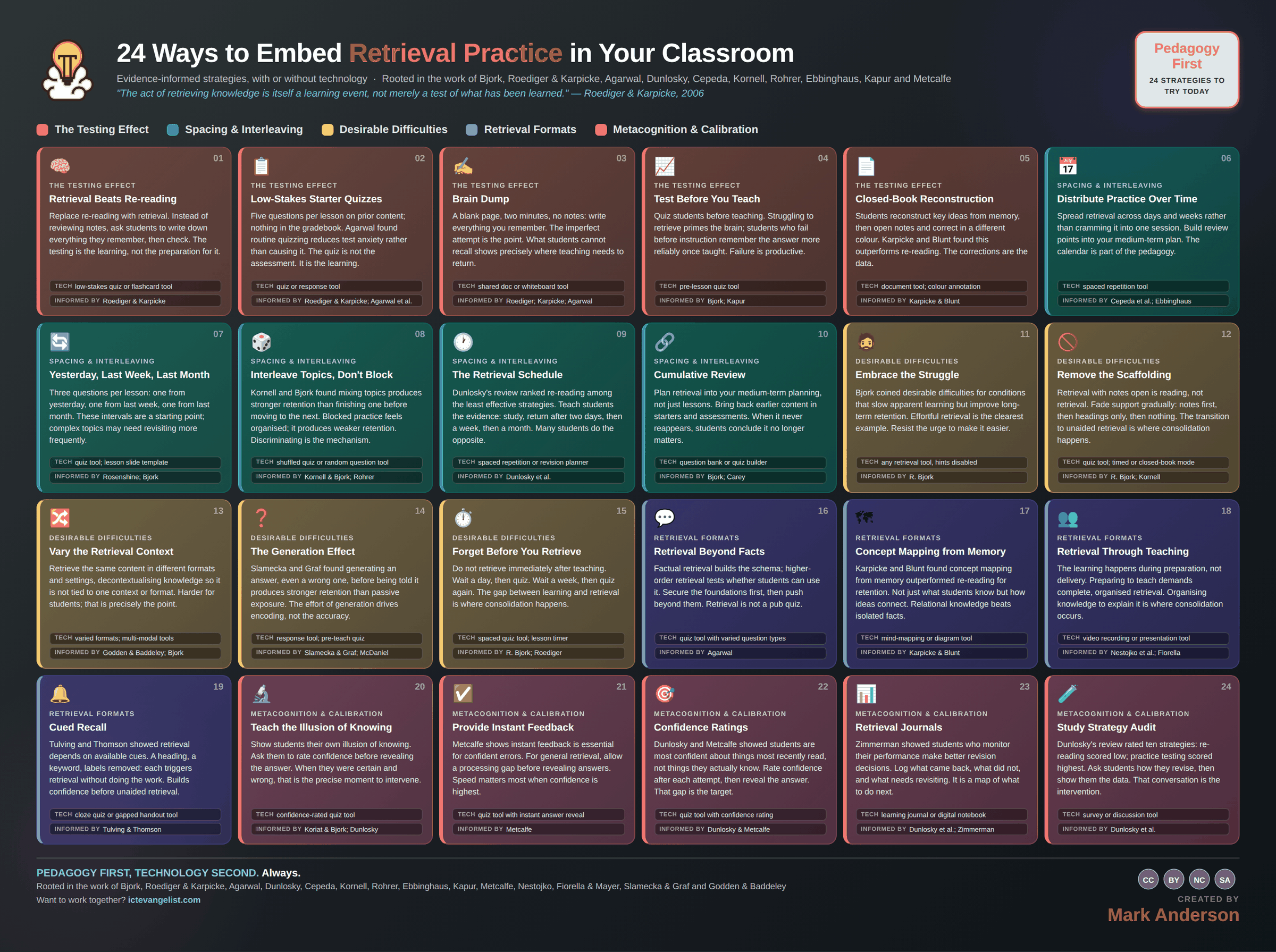
The original

The infographic this chapter expands

The Retrieval Practice infographic: 24 strategies laid out in colour coded groups, each with a title, a short description, a suggested technology and the researchers behind it. Every strategy is written out in full further down this page.
All 24 on one page. Download the full size image for printing or sharing, or read every strategy expanded below.

The thinking

Why these strategies

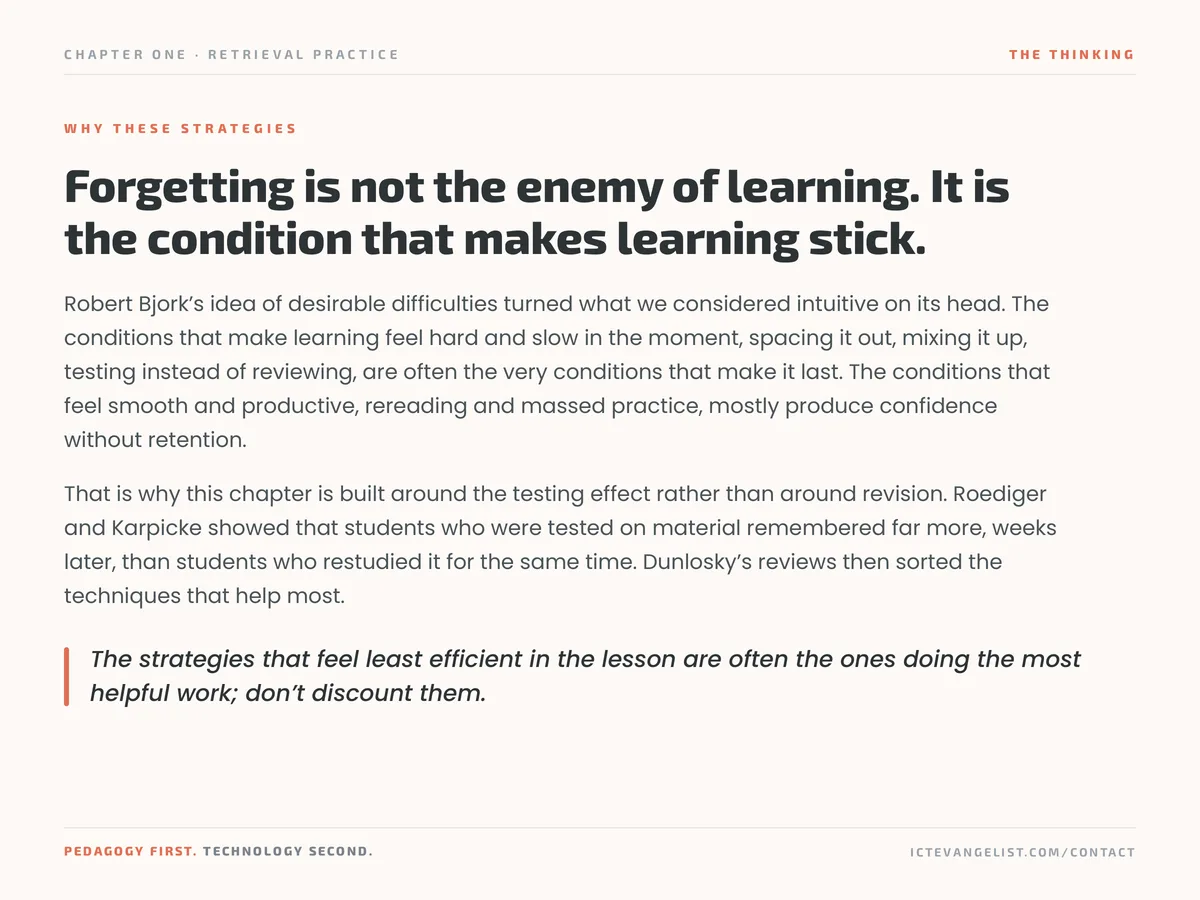
Forgetting is not the enemy of learning. It is the condition that makes learning stick.

Robert Bjork’s idea of desirable difficulties turned what we considered intuitive on its head. The conditions that make learning feel hard and slow in the moment, spacing it out, mixing it up, testing instead of reviewing, are often the very conditions that make it last. The conditions that feel smooth and productive, rereading and massed practice, mostly produce confidence without retention.

That is why this chapter is built around the testing effect rather than around revision. Roediger and Karpicke showed that students who were tested on material remembered far more, weeks later, than students who restudied it for the same time. Dunlosky’s reviews then sorted the techniques that help most.

The strategies that feel least efficient in the lesson are often the ones doing the most helpful work; don’t discount them.
In practice

Where technology serves

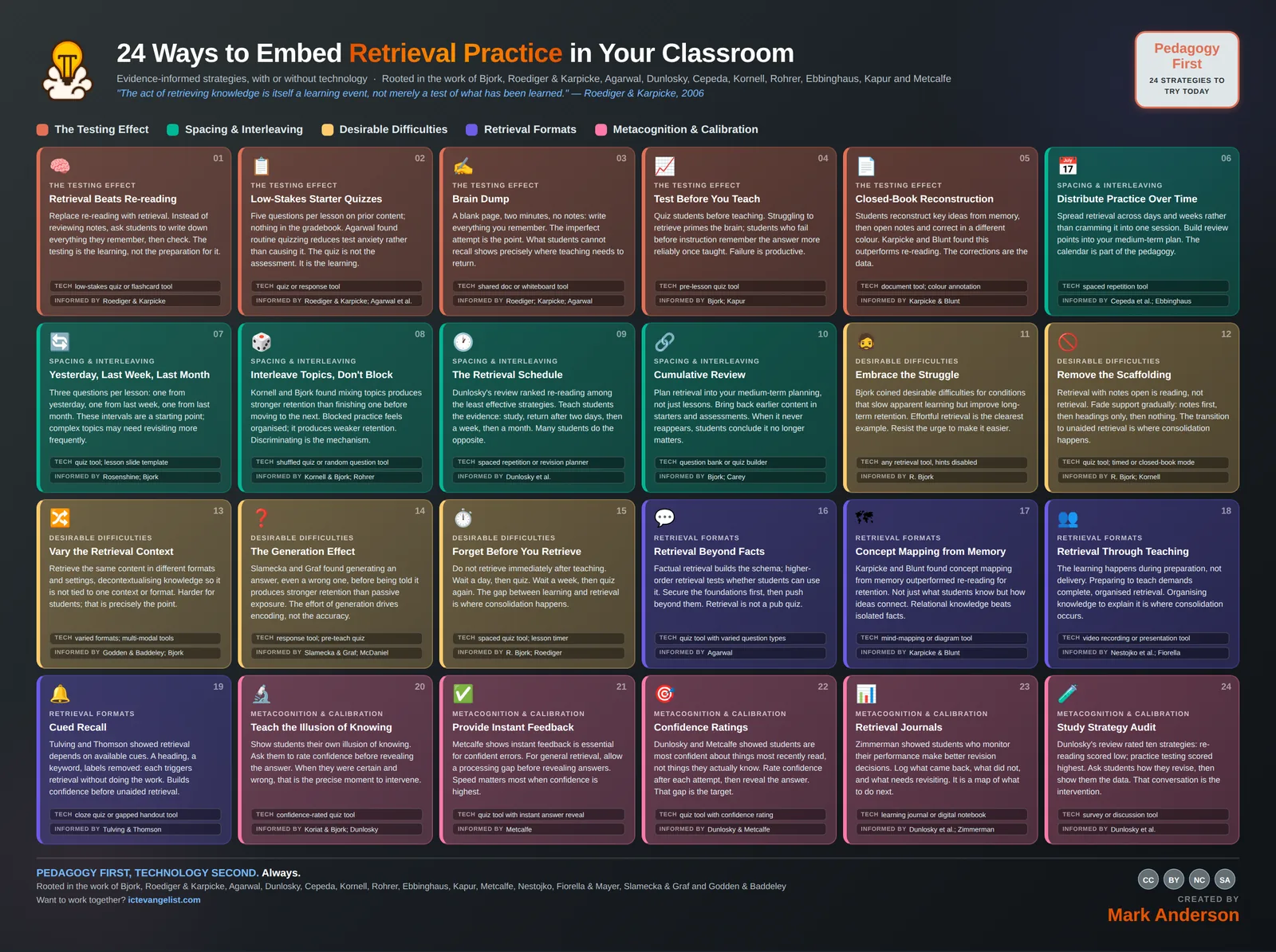
A retrieval tool is only as good as the thinking it provokes. The effort has to stay with the learner.

EdTech is genuinely brilliant for retrieval practice when it makes regular recall simple, rather than one which does the thinking for the students. Low-stakes platforms let you run quick, two-minute starters every lesson with zero marking. Spaced repetition tools automatically revisit older topics at the right intervals. This perfectly matches the research, saving you the headache of tracking it manually.

Ultimately, retrieval is not a game show. If a tool feels like a fastest finger first round, giving answers too quickly or valuing speed over deep thought, it removes the desirable difficulty that makes the practice worthwhile.

Use technology to help manage the activity, but never the struggle for learners. The retrieval effort is the important part, not the admin around it.

Knowing whether it worked

How would you know?

Performance on delayed tests, not on the lesson itself.

Retrieval practice makes lessons look worse and later assessments look better, so measuring it on the day tells you nothing useful. Compare a topic taught with spaced retrieval against one taught without, on a test at least two weeks later. Watch the gap between how confident students feel and how much they actually recall: if that gap is narrowing, calibration is improving too.

The Testing Effect

5 strategies

Replace re-reading with retrieval. Instead of reviewing notes, ask students to write down everything they remember, then check. The testing is the learning, not the preparation for it.

Retrieval means getting knowledge out of memory rather than putting it in again. In practice it's the difference between a class rereading their notes on the water cycle and a class closing their books and writing down everything they can remember about it. The second one looks less productive and does considerably more.

Why it works

Roediger and Karpicke gave students the same material and the same amount of study time, then split them: one group restudied, the other was tested. On an immediate test the restudy group looked better. A week later the tested group remembered far more. The act of retrieving strengthens the memory trace in a way that reviewing doesn't, which is why the effect is called the testing effect even though no assessment is involved.

How to run it

  1. Pick the point in the lesson where you'd normally say "read over that again" and replace it.
  2. Books closed, screens down. Ask for everything they can remember about the topic, in whatever form suits: prose, bullets, a labelled sketch.
  3. Give it two or three minutes. The silence will feel long. Hold it.
  4. Only then let them open books to check and correct in a different colour.
  5. Scan a few. What is missing across the room is what you reteach.

Where technology serves

A quizzing or flashcard tool lowers the cost of doing this every lesson, because nothing needs marking. What technology must not do is supply the answer before the effort has happened. If your tool shows a hint by default, turn it off.

Watch for: Retrieval with notes open is reading. If students can see the material while they answer, you've replaced the difficulty that makes this work with the comfort that undoes it.

Techlow-stakes quiz or flashcard toolInformed byRoediger & Karpicke

Five questions per lesson on prior content; nothing in the gradebook. Agarwal found routine quizzing reduces test anxiety rather than causing it. The quiz is not the assessment. It is the learning.

Five questions at the start of every lesson, all of them on content you taught before today, and none of them recorded as a grade. It takes four minutes and it's the single easiest way to get retrieval into a scheme of work without redesigning anything.

Why it works

Agarwal's classroom studies found that routine low-stakes quizzing reduced test anxiety rather than adding to it. When quizzing is normal, frequent and carries no weight, the stakes drain out of it. Students also arrive expecting to think, which changes the first four minutes of a lesson considerably.

How to run it

  1. Write five questions from previous lessons, not today's.
  2. Display them as students come in so the routine starts without you.
  3. Answers on whiteboards or in the back of books. Nothing goes in the gradebook.
  4. Go through them briskly, correcting misconceptions as you meet them.
  5. Note anything most of the class missed. That is your reteaching list.

Where technology serves

A quiz or response tool gives you the spread of answers instantly, which is worth more than the score. Question banks let you reuse and reshuffle so writing five questions stops being a weekly chore.

Watch for: The moment it counts towards a grade, it stops being low stakes and students start revising for it the night before. That is a different activity with different effects.

Techquiz or response toolInformed byRoediger & Karpicke; Agarwal et al.
03

Brain Dump

A blank page, two minutes, no notes: write everything you remember. The imperfect attempt is the point. What students cannot recall shows precisely where teaching needs to return.

A blank page, two minutes, no notes: write down everything you remember about this topic. No structure imposed, no marks, no right way to lay it out. It's the purest form of free recall available in a classroom.

Why it works

The value sits in the gaps. What a class can't produce without prompting is a precise map of where your teaching needs to return, and it's far more honest than asking whether everyone understood. The effortful, incomplete attempt is doing the work; the tidy version they could copy wouldn't.

How to run it

  1. Name the topic and the time limit. Two minutes is usually enough.
  2. Books closed. Make clear that a messy, partial answer is the expected outcome.
  3. When time is up, let them add to their own page in a second colour from memory prompts you give aloud.
  4. Then open books and correct in a third colour.
  5. Collect five at random. The pattern across five tells you most of what you need.

Where technology serves

A shared document or whiteboard tool works well when you want the class to see the collective picture build up. Individual recall first though, always, or the confident few will do the remembering for everyone.

Watch for: Turning it into a competition for who wrote most rewards fast writers rather than secure knowledge, and it penalises anyone who finds writing effortful.

Techshared doc or whiteboard toolInformed byRoediger; Karpicke; Agarwal
04

Test Before You Teach

Quiz students before teaching. Struggling to retrieve primes the brain; students who fail before instruction remember the answer more reliably once taught. Failure is productive.

Quiz the class on material you haven't taught yet. They will get most of it wrong, which is the point. The failed attempt primes them for the teaching that follows.

Why it works

Bjork's work on desirable difficulties and Kapur's on productive failure both point the same way: struggling to retrieve something you don't yet know improves how well you remember it once you're told. The brain that has just searched for an answer and come up empty is markedly better prepared to receive that answer than the brain that hasn't.

How to run it

  1. Write four or five questions on the content of today's lesson.
  2. Set them before any teaching, and say plainly that you expect them not to know most of it.
  3. Let them attempt everything. Guessing is fine. Blank is not.
  4. Teach the lesson.
  5. Return to the same questions at the end so they can see the shift.

Where technology serves

A pre-lesson quiz tool makes this a two-minute routine rather than a printing job, and lets you compare the before and after picture without marking anything.

Watch for: If students think the pre-test counts for something, the failure becomes threatening rather than productive. Be explicit that getting it wrong now is exactly what is supposed to happen.

Techpre-lesson quiz toolInformed byBjork; KapurAlso inFormative Assessment

Students reconstruct key ideas from memory, then open notes and correct in a different colour. Karpicke and Blunt found this outperforms re-reading. The corrections are the data.

Why it works

Karpicke and Blunt found that retrieval-based reconstruction beat elaborative study for later retention, including on questions requiring inference rather than recall. Writing it out from memory forces you to organise the knowledge, and organising is where the learning happens. The second colour then makes the gap visible to both of you.

How to run it

  1. Give a clear scope: this topic, these ideas, roughly this much.
  2. Closed book reconstruction first, in their usual pen.
  3. Notes open, corrections and additions in a contrasting colour.
  4. Ask them to circle the single thing they most need to revisit.
  5. Next lesson, start with those circled items.

Where technology serves

A document tool with colour annotation keeps the two passes visually distinct and makes the work easy to return to weeks later, which paper versions rarely are.

Watch for: If they copy rather than reconstruct, you've a transcription exercise. Watch for books that open too early and for reconstructions that match the notes suspiciously closely.

Techdocument tool; colour annotationInformed byKarpicke & Blunt

Spacing & Interleaving

5 strategies

Spread retrieval across days and weeks rather than cramming it into one session. Build review points into your medium-term plan. The calendar is part of the pedagogy.

Spread retrieval across days and weeks rather than concentrating it in one session. The same total practice time, distributed differently, produces substantially better retention.

Why it works

Ebbinghaus mapped the forgetting curve in the 1880s and Cepeda's meta-analysis confirmed the practical consequence: material revisited at intervals is retained far longer than material studied once in a block. The gap is not wasted time. Some forgetting between attempts is what makes the next retrieval effortful, and the effort is what consolidates.

How to run it

  1. When you plan a unit, mark the review points before you plan the lessons.
  2. Aim to return to significant content at widening intervals: a few days, then a couple of weeks, then a month.
  3. Keep each return short. Three questions is plenty.
  4. Protect those slots when the scheme of work gets tight, because they're the bit that makes the rest stick.

Where technology serves

Spaced repetition tools schedule the return automatically, which is precisely the admin that otherwise makes spacing collapse under pressure. Let the tool own the calendar; keep the thinking with the student.

Watch for: Spacing gets cut first when you are behind. That feels like efficiency and is the opposite, because blocked teaching produces confident students who can't retrieve the material in June.

Techspaced repetition toolInformed byCepeda et al.; Ebbinghaus

Three questions per lesson: one from yesterday, one from last week, one from last month. These intervals are a starting point; complex topics may need revisiting more frequently.

Three questions at the start of a lesson: one on yesterday's content, one on last week's, one on last month's. It's the simplest possible implementation of spacing and it fits in five minutes.

Why it works

Rosenshine's principles put daily review at the top for good reason, and Bjork's spacing research explains why the three different intervals matter. Yesterday's question checks consolidation, last week's checks retention, last month's checks whether it has made it into long-term memory at all. The three together tell you more than any one of them.

How to run it

  1. Build the three-question slide into your lesson template so it's always there.
  2. Draw the questions from your own scheme of work, not a generic bank.
  3. Whiteboards up, so you see the whole room rather than the one who volunteers.
  4. Adjust the intervals for difficulty. Genuinely hard content needs revisiting sooner than a month.

Where technology serves

A quiz tool or a lesson slide template makes this repeatable. The template matters more than the tool, because what kills the routine is having to invent it every morning.

Watch for: The intervals are a starting point, not a rule. If last month's question comes back blank across the room, the content needed revisiting three weeks ago.

Techquiz tool; lesson slide templateInformed byRosenshine; Bjork

Kornell and Bjork found mixing topics produces stronger retention than finishing one before moving to the next. Blocked practice feels organised; it produces weaker retention. Discriminating is the mechanism.

Mix question types and topics within a practice session rather than finishing one type before starting the next. Instead of twenty questions on one method, give twenty that switch between three.

Why it works

Kornell and Bjork, and Rohrer's work in mathematics, found that interleaved practice produces stronger long-term performance than blocked practice, even though it feels worse during the session. Blocking lets students apply a method without deciding which method applies. Interleaving forces the discrimination, and discriminating is most of what an exam question actually asks for.

How to run it

  1. Take a worksheet that runs through one method and reorder it so types alternate.
  2. Warn the class that this will feel harder and slower than usual. It will.
  3. Expect performance in the session to dip. That is not a sign it is failing.
  4. Compare on a delayed test rather than an immediate one.

Where technology serves

A shuffled quiz or random question tool does the interleaving for you, and removes the temptation to group similar questions together for tidiness.

Watch for: Interleaving needs secure foundations first. Mix topics before the individual methods are understood and you get confusion rather than discrimination.

Techshuffled quiz or random question toolInformed byKornell & Bjork; Rohrer

Dunlosky's review ranked re-reading among the least effective strategies. Teach students the evidence: study, return after two days, then a week, then a month. Many students do the opposite.

Teach students the schedule itself: study it, come back after two days, then after a week, then after a month. Most students do the opposite, which is to reread everything the night before.

Why it works

Dunlosky's review of ten common study techniques rated practice testing and distributed practice as the two with the strongest evidence, and rated rereading and highlighting near the bottom. Students overwhelmingly use the bottom two, because those feel fluent. Showing them the ranking is often the intervention.

How to run it

  1. Show the class the actual evidence on which techniques work. They find it genuinely surprising.
  2. Give them a concrete schedule rather than advice to space it out.
  3. Model it for one topic so they see what a two-day return looks like in practice.
  4. Ask them to plan the next fortnight's returns for one subject, then hold them to it.

Where technology serves

Spaced repetition apps and revision planners make the schedule self-running. The teaching is in the first conversation about why the schedule looks like that.

Watch for: Telling students to space their revision without showing them what it looks like on a calendar produces agreement and no change in behaviour.

Techspaced repetition or revision plannerInformed byDunlosky et al.
10

Cumulative Review

Plan retrieval into your medium-term planning, not just lessons. Bring back earlier content in starters and assessments. When it never reappears, students conclude it no longer matters.

Build earlier content back into starters, homework and assessments across the year, so nothing is finished the moment the unit ends.

Why it works

Bjork's work on spacing, and the practical point Benedict Carey makes well, is that memory needs repeated retrieval at intervals to stay accessible. There's also a signalling effect worth taking seriously: when content never reappears, students correctly infer that it no longer matters, and they stop maintaining it.

How to run it

  1. Write your medium-term plan with cumulative review built in, not appended.
  2. Every assessment includes questions from earlier units, not just the current one.
  3. Make the cumulative nature explicit so students know old content stays live.
  4. Keep a running question bank per unit so pulling old material back is quick.

Where technology serves

A question bank or quiz builder with tagging by unit makes cumulative assessment a filtering job rather than a writing job.

Watch for: Cumulative review that only ever appears in the final exam isn't cumulative review. It has to show up in ordinary weeks to change what students maintain.

Techquestion bank or quiz builderInformed byBjork; Carey

Desirable Difficulties

5 strategies
11

Embrace the Struggle

Bjork coined desirable difficulties for conditions that slow apparent learning but improve long-term retention. Effortful retrieval is the clearest example. Resist the urge to make it easier.

Choose the version of a task that feels harder in the lesson when the evidence says it retains better. Effortful retrieval is the clearest example, but so are spacing, interleaving and reduced scaffolding.

Why it works

Bjork coined desirable difficulties for exactly this: conditions that slow apparent learning during instruction but improve retention and transfer afterwards. The uncomfortable part is that fluency during a lesson is a poor guide to learning, and both teachers and students read it as a good one.

How to run it

  1. Notice where you've made something easier out of kindness and ask whether it removed the thinking.
  2. Delay the hint. Count to five before you offer it.
  3. Let a struggle run a little longer than is comfortable before you intervene.
  4. Explain to the class why the lesson feels harder, so it doesn't read as poor teaching.

Where technology serves

Any retrieval tool works, with hints and multiple-choice options disabled. The default settings on most platforms are tuned for engagement, not for difficulty.

Watch for: Desirable is doing real work in that phrase. Difficulty that a student has no route through is just difficulty, and it teaches them that the subject isn't for them.

Techany retrieval tool, hints disabledInformed byR. Bjork

Retrieval with notes open is reading, not retrieval. Fade support gradually: notes first, then headings only, then nothing. The transition to unaided retrieval is where consolidation happens.

Why it works

Bjork and Kornell's work on scaffolding and retrieval shows that support which is never withdrawn produces performance that collapses the moment it's removed. Fading isn't a nicety at the end; it's the mechanism by which the student takes over.

How to run it

  1. Plan three passes over the content with decreasing support.
  2. Pass one: notes available, focus on getting the shape right.
  3. Pass two: headings or a skeleton only.
  4. Pass three: blank page.
  5. Be explicit that the third pass is the one that counts for their own judgement of what they know.

Where technology serves

A quiz tool with a closed-book or timed mode enforces the final pass in a way that trusting to willpower doesn't.

Watch for: Fading only works if you actually do it. Scaffolds have a habit of becoming permanent because removing them makes the class look less successful for a week.

Techquiz tool; timed or closed-book modeInformed byR. Bjork; Kornell

Retrieve the same content in different formats and settings, decontextualising knowledge so it is not tied to one context or format. Harder for students; that is precisely the point.

Retrieve the same knowledge in different formats and settings: written one week, spoken the next, as a diagram the week after, in a different room or a different order.

Why it works

Godden and Baddeley's divers famously recalled better in the environment where they learned, which tells you memory picks up contextual cues you didn't intend to teach. Varying the context decontextualises the knowledge, so it isn't welded to one format, one room or one question style. It's harder for students, and that's precisely the point.

How to run it

  1. Rotate the format of your recall activities rather than settling on a favourite.
  2. Ask for the same content as prose, as a diagram, as an explanation to a partner.
  3. Occasionally change where or when the retrieval happens.
  4. Vary the question wording so recall isn't tied to a phrasing.

Where technology serves

Multi-modal tools let you switch format without rebuilding the activity each time: the same content as a quiz, a mind map, a voice note.

Watch for: Variety for its own sake becomes novelty-chasing. The variation has to be in how the knowledge is retrieved, not in how entertaining the packaging is.

Techvaried formats; multi-modal toolsInformed byGodden & Baddeley; Bjork

Slamecka and Graf found generating an answer, even a wrong one, before being told it produces stronger retention than passive exposure. The effort of generation drives encoding, not the accuracy.

Have students produce an answer before they're given it, even when you know the answer will be wrong. Generating beats being told, and generating badly still beats being told.

Why it works

Slamecka and Graf's generation effect showed that words a participant produced were remembered better than words they read, and McDaniel's later work extended it to classroom material. The effort of generation is what drives the encoding. Accuracy is close to irrelevant at that moment.

How to run it

  1. Before defining a term, ask what they think it might mean.
  2. Before giving the method, ask how they'd approach it.
  3. Take a few answers without correcting them yet.
  4. Then teach, and explicitly connect back to what they guessed.

Where technology serves

A response tool captures every student's guess rather than the three you've time to hear, and lets you show the spread of thinking before you resolve it.

Watch for: If wrong guesses get visibly corrected in front of the class in a way that stings, students learn to stay quiet, and the generation stops happening.

Techresponse tool; pre-teach quizInformed bySlamecka & Graf; McDaniel
15

Forget Before You Retrieve

Do not retrieve immediately after teaching. Wait a day, then quiz. Wait a week, then quiz again. The gap between learning and retrieval is where consolidation happens.

Why it works

Retrieval immediately after instruction is easy because the material is still in working memory, and easy retrieval strengthens little. Bjork's storage and retrieval strength distinction explains it: you need retrieval strength to have dropped somewhat for the act of retrieving to do useful work. Some forgetting is a precondition.

How to run it

  1. Resist the end-of-lesson quiz on today's content as a measure of learning. Use it as a check of attention instead.
  2. Put the real retrieval a lesson or two later.
  3. Make the delay explicit to students so the difficulty is expected.
  4. Track which items need shorter gaps because they keep coming back blank.

Where technology serves

A spaced quiz tool handles the delay for you. Without one, the intention to come back in three days rarely survives contact with a busy week.

Watch for: An immediate end-of-lesson quiz that everybody passes is reassuring and tells you almost nothing about what will still be there in a fortnight.

Techspaced quiz tool; lesson timerInformed byR. Bjork; Roediger

Retrieval Formats

4 strategies

Factual retrieval builds the schema; higher-order retrieval tests whether students can use it. Secure the foundations first, then push beyond them. Retrieval is not a pub quiz.

Retrieval is not only for facts. Once the factual base is secure, retrieve explanations, comparisons, causes and applications too.

Why it works

Agarwal's work found that higher-order retrieval practice supported higher-order performance, and that factual retrieval alone didn't automatically transfer. The factual layer builds the schema you need; the higher-order questions test whether the student can use it. Both matter, and in that order.

How to run it

  1. Start a topic with factual recall to secure the foundations.
  2. Move to why and how questions once the facts are reliable.
  3. Ask for comparisons and connections between topics, not just within one.
  4. Keep both types running rather than graduating away from facts entirely.

Where technology serves

A quiz tool with varied question types, including short written responses, stops the routine collapsing into multiple choice by default.

Watch for: Retrieval practice that never leaves the factual layer produces students who can name everything and explain nothing. The reverse, jumping to analysis on shaky foundations, fails differently and just as reliably.

Techquiz tool with varied question typesInformed byAgarwal

Karpicke and Blunt found concept mapping from memory outperformed re-reading for retention. Not just what students know but how ideas connect. Relational knowledge beats isolated facts.

Students draw a concept map of a topic from memory, showing not just the ideas but how they connect. Notes stay closed until the map is done.

Why it works

Karpicke and Blunt compared concept mapping while studying against retrieval practice, and found retrieval won. Mapping from memory combines both: it's a retrieval task that happens to produce a map. What it surfaces that a list doesn't is relational knowledge, whether the student can see how the parts hang together.

How to run it

  1. Give the topic and, at most, a handful of anchor terms.
  2. Closed book. The map is built from memory.
  3. Insist on labelled links, not just lines. The label is where the thinking shows.
  4. Compare against notes afterwards and add missing connections in another colour.

Where technology serves

A mind-mapping or diagram tool makes maps easy to revise and revisit, which matters if you want students to return to the same map later in the year and extend it.

Watch for: A beautiful map with unlabelled arrows tells you very little. The relationships are the content; the layout is not.

Techmind-mapping or diagram toolInformed byKarpicke & Blunt

The learning happens during preparation, not delivery. Preparing to teach demands complete, organised retrieval. Organising knowledge to explain it is where consolidation occurs.

Have students prepare to teach a topic to someone else. The learning happens in the preparation, whether or not the teaching ever takes place.

Why it works

Nestojko and colleagues found that simply expecting to teach material changed how people studied it and improved recall, compared with expecting to be tested. Fiorella and Mayer's work on learning by teaching points the same way. Preparing to explain forces complete, organised retrieval in a way that answering questions doesn't.

How to run it

  1. Assign a sub-topic each and set the expectation of teaching it.
  2. Insist on preparation from memory first, notes second.
  3. Require a worked example, not just an explanation.
  4. The delivery can be to a partner, to a camera, or not at all. The preparation is the bit that counts.

Where technology serves

A video recording or presentation tool gives the preparation a real audience and produces a revision artefact the class can return to.

Watch for: If students prepare by copying from the textbook, no retrieval has occurred. Set the preparation as a closed-book task first.

Techvideo recording or presentation toolInformed byNestojko et al.; Fiorella
19

Cued Recall

Tulving and Thomson showed retrieval depends on available cues. A heading, a keyword, labels removed: each triggers retrieval without doing the work. Builds confidence before unaided retrieval.

Retrieval supported by a cue: a heading, a first letter, a keyword, a diagram with the labels removed. It triggers the search without doing the searching.

Why it works

Tulving and Thomson's encoding specificity principle established that what you can retrieve depends heavily on the cues available. Cued recall sits usefully between multiple choice, which offers too much, and free recall, which can be overwhelming for students who aren't yet secure. It builds confidence on the way to unaided retrieval.

How to run it

  1. Use cued recall early in a sequence and free recall later.
  2. Cues can be structural: headings, a numbered skeleton, a stripped diagram.
  3. Reduce the cues each time the class returns to the topic.
  4. Be clear with students that the cues are temporary.

Where technology serves

Cloze exercises and gapped handouts generate quickly from existing notes, and a digital version makes reducing the cues on the next pass a two-minute edit.

Watch for: Cues that give away the answer are not cues. If the gap can be filled from the surrounding sentence without knowing the content, nothing has been retrieved.

Techcloze quiz or gapped handout toolInformed byTulving & Thomson

Metacognition & Calibration

5 strategies

Show students their own illusion of knowing. Ask them to rate confidence before revealing the answer. When they were certain and wrong, that is the precise moment to intervene.

Show students the difference between feeling like they know something and actually knowing it. Ask for a confidence rating before the answer is revealed, then let them see the mismatch.

Why it works

Koriat and Bjork called it the illusion of knowing: fluency with material, usually from rereading it recently, gets mistaken for secure knowledge. Dunlosky's work found students consistently overestimate what they'll remember. Confident and wrong is the most useful diagnostic state there's, because it's the one the student can't detect alone.

How to run it

  1. Ask for an answer and a confidence rating together, high, medium or low.
  2. Reveal the answer only afterwards.
  3. Focus the discussion on the high-confidence errors, not the low-confidence ones.
  4. Repeat over weeks so students see their calibration improve.

Where technology serves

A confidence-rated quiz tool captures both dimensions and lets you find the confidently wrong answers across the whole class rather than the few you happen to see.

Watch for: If confidence ratings feel like another thing being marked, students report the confidence they think you want. Keep it genuinely stakes-free.

Techconfidence-rated quiz toolInformed byKoriat & Bjork; Dunlosky

Metcalfe shows instant feedback is essential for confident errors. For general retrieval, allow a processing gap before revealing answers. Speed matters most when confidence is highest.

Reveal the correct answer quickly when a student was confident and wrong. Allow a longer gap when the retrieval was effortful and uncertain.

Why it works

Metcalfe's work on the hypercorrection effect found that high-confidence errors are corrected especially well when feedback arrives promptly. The surprise does useful work. For low-confidence retrieval, an immediate answer can short-circuit the effort that was about to pay off, so the timing genuinely differs by case.

How to run it

  1. For quick factual recall, reveal answers promptly.
  2. For harder reasoning, let the struggle run before you resolve it.
  3. Pay particular attention to answers given confidently and wrongly. Correct those clearly and immediately.
  4. Tell students why the timing varies, so the delay doesn't read as withholding.

Where technology serves

Quiz tools with an instant reveal suit the factual case. For the harder work, turn the instant reveal off; the default is rarely what you want.

Watch for: Blanket immediate feedback on everything feels responsive and removes the productive struggle from the tasks that most needed it.

Techquiz tool with instant answer revealInformed byMetcalfe
22

Confidence Ratings

Dunlosky and Metcalfe showed students are most confident about things most recently read, not things they actually know. Rate confidence after each attempt, then reveal the answer. That gap is the target.

Students rate how confident they're in each answer, then check. Over time the gap between confidence and accuracy narrows, which is a skill in itself.

Why it works

Dunlosky and Metcalfe showed that students are most confident about material they've most recently read, which is a poor proxy for what they know. Calibration improves with repeated feedback on the mismatch. A well-calibrated student revises the right things; a poorly calibrated one revises what already feels comfortable.

How to run it

  1. Two columns: the answer, and a confidence rating.
  2. Check answers, then look at the pattern rather than the score.
  3. Ask each student to name one thing they were sure about and wrong about.
  4. Return to those items specifically in the next round.

Where technology serves

Quiz tools with a confidence field make the pattern visible over time, which is where the value is. A single snapshot tells you much less than a term of them.

Watch for: Confidence ratings only help if students act on them. The rating is data; the revision decision is the point.

Techquiz tool with confidence ratingInformed byDunlosky & Metcalfe
23

Retrieval Journals

Zimmerman showed students who monitor their performance make better revision decisions. Log what came back, what did not, and what needs revisiting. It is a map of what to do next.

A running log of what came back easily, what didn't, and what needs revisiting. Kept by the student, not by you.

Why it works

Zimmerman's self-regulation research found that students who monitor their own performance make better subsequent study decisions. The journal externalises the monitoring so it doesn't depend on memory or honesty in the moment. It also gives a student something concrete to work from in the week before an assessment, rather than a vague sense that they should look at everything.

How to run it

  1. After each retrieval activity, three quick lines: solid, shaky, gone.
  2. Keep it in one place across the year rather than scattered through exercise books.
  3. Set revision from the shaky and gone columns, not from the start of the unit.
  4. Review the journal with them occasionally so it doesn't become a ritual.

Where technology serves

A learning journal or digital notebook keeps it searchable and stops it living in a book that gets left at home.

Watch for: Journals that are filled in because they're checked become fiction. The value depends on it being genuinely for the student.

Techlearning journal or digital notebookInformed byDunlosky et al.; Zimmerman
24

Study Strategy Audit

Dunlosky's review rated ten strategies: re-reading scored low; practice testing scored highest. Ask students how they revise, then show them the data. That conversation is the intervention.

Ask students how they actually revise, then show them what the evidence says about those methods. The conversation is the intervention.

Why it works

Dunlosky and colleagues rated ten study techniques by the strength of evidence behind them. Practice testing and distributed practice came out on top. Highlighting, summarising and rereading, which is what most students do, came out low. Students aren't being lazy; they're using the strategies that feel most productive, and feeling productive is exactly what those strategies are good at.

How to run it

  1. Survey the class anonymously on what they actually do.
  2. Show the ratings alongside their own results.
  3. Do not just tell them to stop rereading. Replace it with a specific alternative for a specific topic.
  4. Come back to it after the next assessment and ask what changed.

Where technology serves

A survey tool makes the anonymous audit quick and gives you a class picture worth showing back to them.

Watch for: One assembly on revision techniques changes very little. This needs to be revisited in the subject, with the subject's content, more than once.

Techsurvey or discussion toolInformed byDunlosky et al.

Want this thinking in your school?

I run keynotes, INSET and workshops on pedagogy, AI and digital strategy, and I work with schools and trusts over time rather than one day and gone. Tell me where your team is and I'll tell you honestly whether I can help.

Back to top