The short answer
Explanation and modelling is how a teacher gets new ideas and processes into pupils' heads. Explaining means presenting new material in small, clear steps that working memory can cope with. Modelling means showing how an expert actually does the task, thinking aloud as you go, then handing the work over gradually through worked examples, guided practice and independent practice.
What is modelling in teaching?
Modelling is showing pupils how an expert does a task, step by step, while saying the thinking out loud. You make the invisible decisions visible: where to start, what to check, what to do when something looks wrong. Pupils then copy the process, with your support fading as they get more confident.
Experts make decisions all the time without noticing, and pupils usually only see the finished product. Then they're asked to produce the same kind of product themselves. Thinking aloud while you work, under a visualiser or on a shared screen, shows them the part they actually need to copy, which is the process.
Narrating decisions is different from narrating actions. "Now I underline the date" is just a caption. "I'm underlining the date because it tells me which rules apply" shows the class the thinking they came for.
How do you explain something well to a class?
Connect to what pupils already know, start with something concrete, then give the new idea in small steps with a quick check after each one. Keep the slides clean, teach the key words first, and get everyone answering at once so you know whether it's landed before you move on.
Telling is not explaining. An explanation has to be built for the mind that receives it, and that's really what Rosenshine's principles of instruction are about: small steps, practice after each one, checks for understanding and reteaching before you move on. Willingham adds that abstract ideas need something concrete to attach to, so show the image, object or clip first and name the idea afterwards.
A class that's listening politely looks exactly the same as a class that understands. So plan a check into the middle of your explanation, on mini whiteboards or a live poll, where everyone answers at once. The explanation is the start of the process rather than the finish.
What does cognitive load theory mean for explanations?
Cognitive load theory, from John Sweller, says working memory is narrow and easily overwhelmed, holding only around four items at once. So a good explanation is an act of load management: fewer things competing for attention, new material in small chunks, and nothing on screen that isn't helping pupils learn.
Every element on a slide takes up one of those slots, so a logo, a border or a sentence nobody needs right now is using space the explanation needs. Sweller's work also gives us split attention, where labels sit away from a diagram and pupils have to search between them, and the redundancy effect, where reading out text that's already on the screen makes pupils process it twice.
It's fair to say the theory has moved on since it was first set out. Sweller, van Merriënboer and Paas reviewed it themselves in 2019, including where it has been revised, and that review is a good place to start if you want the detail. The practical messages for explanations have held up: keep it clear, keep it chunked and keep the clutter out.
Where this research comes from
- Principles of instruction: Barak Rosenshine
- Cognitive load theory: John Sweller
- Worked examples: Sweller and Cooper, and Atkinson
- Multimedia learning: Richard Mayer
- Dual coding theory: Allan Paivio
- Concrete examples and memory: Daniel Willingham
- Technology in the classroom: the EEF's Digital Technology Guidance (2019)
What are worked examples in teaching?
A worked example is a problem solved in full, step by step, for pupils to study before they try one themselves. Sweller and Cooper found students can learn more from studying worked examples than from solving equivalent problems, because novices aren't spending all their working memory just searching for a method.
Atkinson's research supports alternating them with practice: an example, then a try, then another example, then another try. Each attempt comes while the example is still fresh, and the practice task should be genuinely parallel, with the same structure and a different surface.
Then you fade the support. Rosenshine's gradient is a complete example first, then a partial one with gaps, then independent practice. It's what a lot of teachers know as "I do, we do, you do", and how quickly you fade is your judgement, made per class and sometimes per pupil, because you're the one who can see the attempts.
What are the best strategies for explanation and modelling?
The best strategies cut what pupils have to hold in their heads and make expert thinking visible. Small steps, concrete examples first, clean slides, words and images together, thinking aloud under a visualiser, and worked examples that fade into independent practice all do this well.
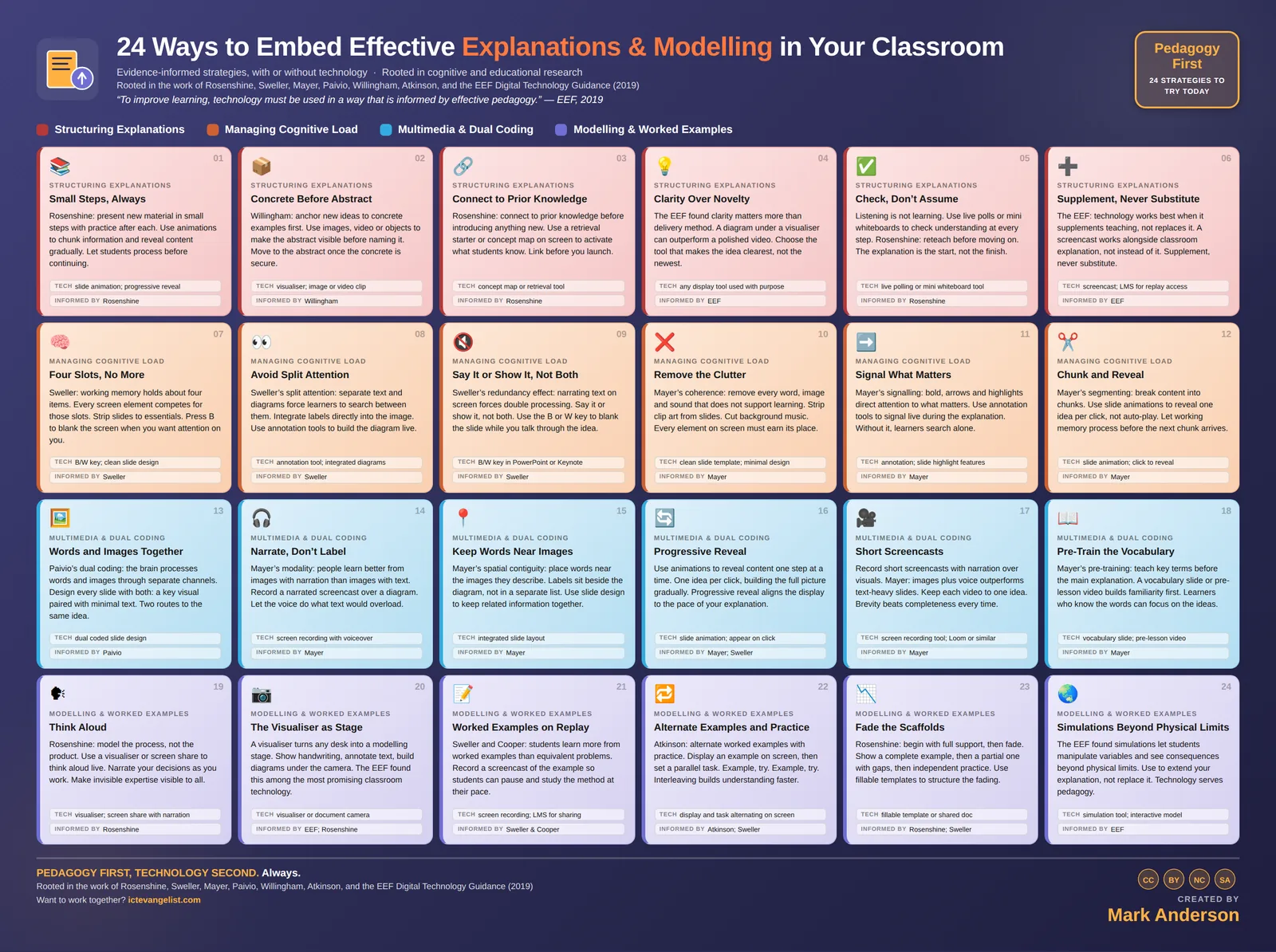
In the guide I've grouped 24 strategies into four families: structuring explanations, managing cognitive load, multimedia and dual coding, and modelling and worked examples. The full list is further down this page, and each one has its own page with an example, a way to begin and what to look out for.
Dual coding sits in the third family. Paivio showed that words and images reach the mind through separate channels, and Mayer built his multimedia principles on that, so pair a key visual with a few words and narrate a diagram rather than captioning it. If you're starting from scratch, pick one strategy and get it right before adding another.
What are the common mistakes with explanations and modelling?
The commonest mistake is the busy slide that feels rich but teaches little, because it forces split attention just when the explanation needs space. Others are reading slide text aloud, showing only the finished product, giving too much at once, and moving on without checking that pupils have understood.
Clip art, background music and themed borders aren't neutral, because if something is on the screen, pupils are processing it. Mayer's coherence principle is firm on this: remove every word, image and sound that doesn't support the learning. Labels in a separate key below a diagram are another common one, because the eye has to travel and the memory has to hold the label all the way across.
The other trap is support that never fades. Scaffolds are there to be removed as competence grows, so plan the handover from the start.
How can technology and AI help with explanation and modelling?
Technology helps most when it supports your explanation and never replaces it. A visualiser turns any desk into a modelling stage, slide animations let you reveal one idea per click, and short narrated screencasts let pupils replay a worked example at their own pace. AI can help you draft examples and explanations, as long as you check them.
The EEF's guidance is that technology works best when it supplements teaching rather than substituting for it, and that clarity counts for more than the delivery method. A simple diagram under a visualiser can outperform a polished video. The EEF found the visualiser among the most promising classroom technology, which is quite striking for such a modest device. Pedagogy first, technology second.
With AI, the same rule applies to any explanation, analogy or worked example it drafts for you. Check its work, like every child in your classroom. And remember the B key, which blanks the screen when you want the attention on you.
How do I start improving my explanations tomorrow?
Take one slide you'll teach tomorrow and strip it back: cut the decoration, put the labels on the diagram, and delete the sentences you were going to read out, so you say them instead. Then plan one whole-class check into the middle of the explanation, on mini whiteboards.
Teach it and see whether anything is actually missed. Then look at what happens in the check: who could do it, who couldn't, and whether you need to reteach a step before moving on. Keep going for a few weeks, one slide deck and one explanation at a time, and look at what pupils can do unaided afterwards compared with the last topic.
From the guide
All 24 explanation and modelling strategies
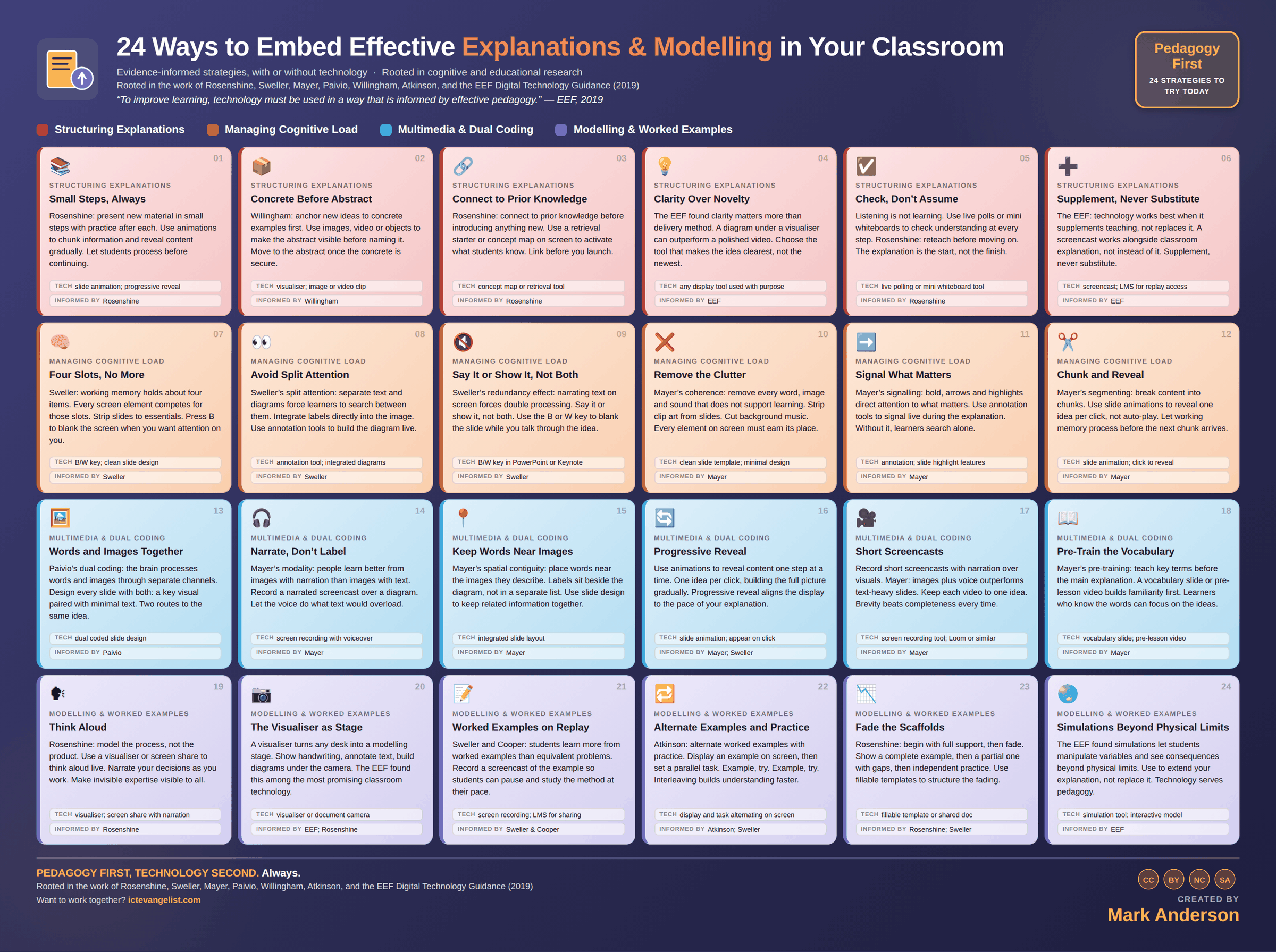
Each one has its own page, with why you might use it, an example and a way to begin. You'll find them all, with the infographic, in 05 Explanations & Modelling.
Structuring Explanations
- Small Steps, Always Rosenshine: present new material in small steps with practice after each. Use animations to chunk information and reveal content gradually. Let students process before continuing. 05 Explanations & Modelling · Structuring Explanations
- Concrete Before Abstract Willingham: anchor new ideas to concrete examples first. Use images, video or objects to make the abstract visible before naming it. Move to the abstract once the concrete is secure. 05 Explanations & Modelling · Structuring Explanations
- Connect to Prior Knowledge Rosenshine: connect to prior knowledge before introducing anything new. Use a retrieval starter or concept map on screen to activate what students know. Link before you launch. 05 Explanations & Modelling · Structuring Explanations
- Clarity Over Novelty The EEF found clarity matters more than delivery method. A diagram under a visualiser can outperform a polished video. Choose the tool that makes the idea clearest, not the newest. 05 Explanations & Modelling · Structuring Explanations
- Check, Don’t Assume Listening is not learning. Use live polls or mini whiteboards to check understanding at every step. Rosenshine: reteach before moving on. The explanation is the start, not the finish. 05 Explanations & Modelling · Structuring Explanations
- Supplement, Never Substitute The EEF: technology works best when it supplements teaching, not replaces it. A screencast works alongside classroom explanation, not instead of it. Supplement, never substitute. 05 Explanations & Modelling · Structuring Explanations
Managing Cognitive Load
- Four Slots, No More Sweller: working memory holds about four items. Every screen element competes for those slots. Strip slides to essentials. Press B to blank the screen when you want attention on you. 05 Explanations & Modelling · Managing Cognitive Load
- Avoid Split Attention Sweller’s split attention: separate text and diagrams force learners to search between them. Integrate labels directly into the image. Use annotation tools to build the diagram live. 05 Explanations & Modelling · Managing Cognitive Load
- Say It or Show It, Not Both Sweller’s redundancy effect: narrating text on screen forces double processing. Say it or show it, not both. Use the B or W key to blank the slide while you talk through the idea. 05 Explanations & Modelling · Managing Cognitive Load
- Remove the Clutter Mayer’s coherence: remove every word, image and sound that does not support learning. Strip clip art from slides. Cut background music. Every element on screen must earn its place. 05 Explanations & Modelling · Managing Cognitive Load
- Signal What Matters Mayer’s signalling: bold, arrows and highlights direct attention to what matters. Use annotation tools to signal live during the explanation. Without it, learners search alone. 05 Explanations & Modelling · Managing Cognitive Load
- Chunk and Reveal Mayer’s segmenting: break content into chunks. Use slide animations to reveal one idea per click, not auto-play. Let working memory process before the next chunk arrives. 05 Explanations & Modelling · Managing Cognitive Load
Multimedia & Dual Coding
- Words and Images Together Paivio’s dual coding: the brain processes words and images through separate channels. Design every slide with both: a key visual paired with minimal text. Two routes to the same idea. 05 Explanations & Modelling · Multimedia & Dual Coding
- Narrate, Don’t Label Mayer’s modality: people learn better from images with narration than images with text. Record a narrated screencast over a diagram. Let the voice do what text would overload. 05 Explanations & Modelling · Multimedia & Dual Coding
- Keep Words Near Images Mayer’s spatial contiguity: place words near the images they describe. Labels sit beside the diagram, not in a separate list. Use slide design to keep related information together. 05 Explanations & Modelling · Multimedia & Dual Coding
- Progressive Reveal Use animations to reveal content one step at a time. One idea per click, building the full picture gradually. Progressive reveal aligns the display to the pace of your explanation. 05 Explanations & Modelling · Multimedia & Dual Coding
- Short Screencasts Record short screencasts with narration over visuals. Mayer: images plus voice outperforms text-heavy slides. Keep each video to one idea. Brevity beats completeness every time. 05 Explanations & Modelling · Multimedia & Dual Coding
- Pre-Train the Vocabulary Mayer’s pre-training: teach key terms before the main explanation. A vocabulary slide or pre-lesson video builds familiarity first. Learners who know the words can focus on the ideas. 05 Explanations & Modelling · Multimedia & Dual Coding
Modelling & Worked Examples
- Think Aloud Rosenshine: model the process, not the product. Use a visualiser or screen share to think aloud live. Narrate your decisions as you work. Make invisible expertise visible to all. 05 Explanations & Modelling · Modelling & Worked Examples
- The Visualiser as Stage A visualiser turns any desk into a modelling stage. Show handwriting, annotate text, build diagrams under the camera. The EEF found this among the most promising classroom technology. 05 Explanations & Modelling · Modelling & Worked Examples
- Worked Examples on Replay Sweller and Cooper: students learn more from worked examples than equivalent problems. Record a screencast of the example so students can pause and study the method at their pace. 05 Explanations & Modelling · Modelling & Worked Examples
- Alternate Examples and Practice Atkinson: alternate worked examples with practice. Display an example on screen, then set a parallel task. Example, try. Example, try. Interleaving builds understanding faster. 05 Explanations & Modelling · Modelling & Worked Examples
- Fade the Scaffolds Rosenshine: begin with full support, then fade. Show a complete example, then a partial one with gaps, then independent practice. Use fillable templates to structure the fading. 05 Explanations & Modelling · Modelling & Worked Examples
- Simulations Beyond Physical Limits The EEF found simulations let students manipulate variables and see consequences beyond physical limits. Use to extend your explanation, not replace it. Technology serves pedagogy. 05 Explanations & Modelling · Modelling & Worked Examples
Quick questions
Explanation and modelling: quick questions
What is the difference between explaining and modelling?
Explaining gets an idea across: what something is and why it works. Modelling shows how to do something, with the expert thinking said out loud. Most good teaching uses both, an explanation of the idea followed by a modelled example of it in use.
What is dual coding in teaching?
Dual coding comes from Paivio's theory that words and images are processed through separate channels. In the classroom it means pairing a clear visual with a few words, both carrying the same idea, so pupils get two routes to it. An unrelated picture doesn't count; it's just clutter.
What does "I do, we do, you do" mean?
It's a simple way of describing the gradual handover in modelling. You model the task in full, then you do one together with the class, then pupils do it on their own. Rosenshine describes the same pattern as scaffolds being removed as competence grows.
Should I read out the text on my slides?
No. Sweller's redundancy effect says pupils end up processing the written and spoken versions at once, and the two compete. Say it or show it. Text pupils read silently, in their own time, is a different and perfectly reasonable situation.
How much can working memory hold?
Around four items at a time, which is why every element on a slide competes for space. Strip slides to the essentials, reveal one idea per click and teach key vocabulary before the main explanation, so pupils aren't learning the words and the ideas at once.
Do I need a visualiser for modelling?
You don't need one, but it really helps. A visualiser lets the whole room see handwriting, annotation and a diagram taking shape, crossings-out included. The EEF found it among the most promising classroom technology.
Further reading and evidence
Where this thinking comes from
The wider evidence around this area, kept deliberately short. No single study validates all 24 strategies; these are the traditions the thinking comes from, and good places to read further. How this site uses evidence.
- Rosenshine (2012), Principles of Instruction, American Educator. Ten principles, small steps and guided practice among them, drawn from cognitive science and studies of effective teachers.
- Sweller, van Merriënboer & Paas (2019), Cognitive Architecture and Instructional Design: 20 Years Later, Educational Psychology Review. Cognitive load theory reviewed by its authors, including where the theory has been revised.
- Mayer, Multimedia Learning (Cambridge University Press). The principles behind dual coding done properly: coherence, signalling, segmenting, modality and the rest.
- Willingham, Why Don’t Students Like School?. Memory is the residue of thought, and why concrete examples and stories work.
More teacher's guides
The other guides, and the model behind them
Want to take this further?
Support is available
If you're a leader wanting help to turn this into professional learning across your school or trust, that's exactly the work I do.