Chapter Two of six

Formative Assessment

Rooted in the work of Black, Wiliam, Butler, Sadler, Berger, Hattie, Bjork, Rosenshine, Angelo & Cross and CAST

The term formative should apply not to the assessment but to the function that the evidence generated by the assessment actually serves.

Dylan Wiliam, Assessment: The Bridge between Teaching and Learning, 2013

24 strategies5 groupsabout 25 minutes to read

The original

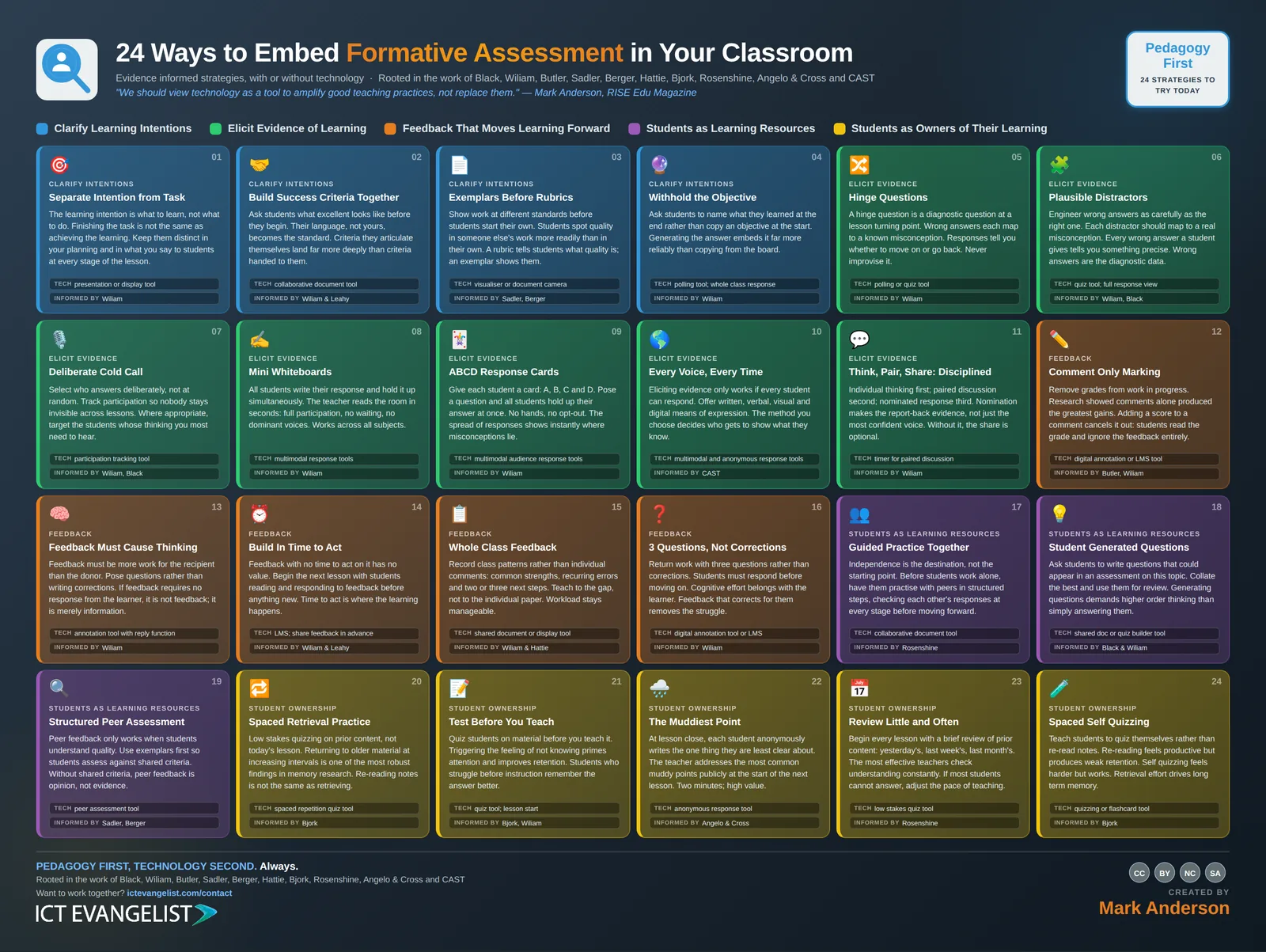
The infographic this chapter expands

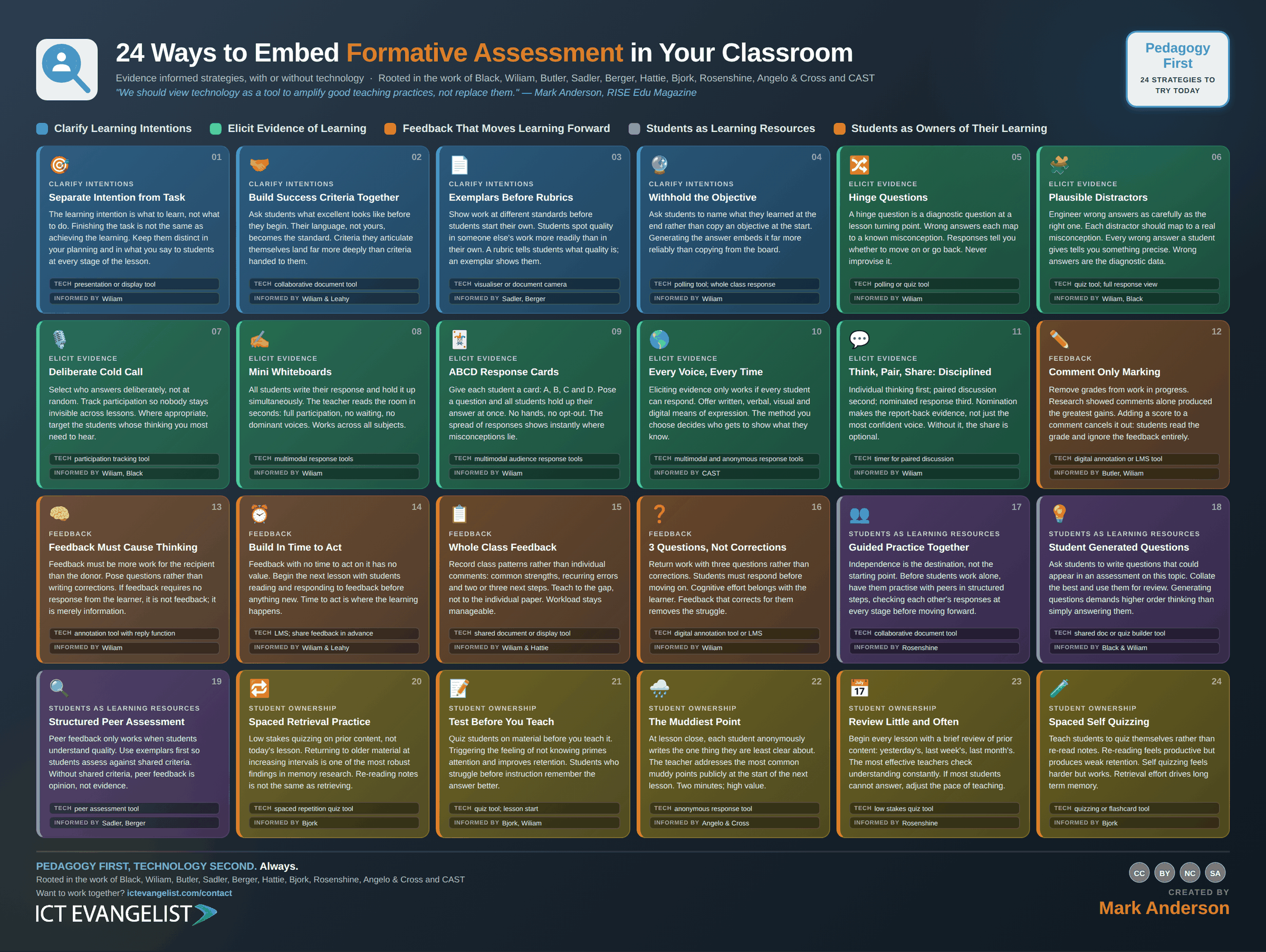
The Formative Assessment infographic: 24 strategies laid out in colour coded groups, each with a title, a short description, a suggested technology and the researchers behind it. Every strategy is written out in full further down this page.
All 24 on one page. Download the full size image for printing or sharing, or read every strategy expanded below.

The thinking

Why these strategies

If it does not change what you do next, it was not formative. It was just a test with a kinder name.

Dylan Wiliam and Paul Blackโ€™s work were obviously my โ€˜go toโ€™ for this chapter, because it answers the only three questions assessment exists to serve: where is the learner going, where are they now, and what closes the gap. The strategies Iโ€™ve shared in this section aim to move assessment out of the marking pile and into the lesson itself, where it can help teaching in the moment.

The most difficult, and this is where technology can often help, is the most powerful: eliciting evidence from every student, not just the confident few.
In practice

Where technology serves

Technology can make every learner visible at once. That is its real contribution to assessment.

The classic weakness of classroom questioning is that you hear from a handful of pupils and make assumptions about the rest. Polling tools, mini whiteboards and simple response systems help take much of that problem away by gathering a response from everyone at the same time. That turns a rough feel for the room into something much closer to evidence.

But evidence is only useful when you act on it. A tool that shows you a bar chart of misconceptions has done nothing until it changes what you do in the next five minutes because of what it shows.
Knowing whether it worked

How would you know?

How often teaching changed direction because of what came back.

The measure isn't how much evidence you gathered, it's how much of it altered the next five minutes. Ask a department to log, for a fortnight, every time a hinge question or a whiteboard round made them reteach rather than move on. If that number is near zero, the assessment is happening and the formative part isn't.

Clarify Learning Intentions

4 strategies

The learning intention is what to learn, not what to do. Finishing the task is not the same as achieving the learning. Keep them distinct in your planning and in what you say to students at every stage of the lesson.

The learning intention is what students are meant to learn. The task is what they are meant to do. They aren't the same thing, and conflating them is one of the most common planning errors there's.

Why it works

Wiliam's point is that students who are clear only about the task will optimise for completing it. Finish the poster, fill the sheet, get to question ten. None of that guarantees the learning. When the intention is stated separately, students have something to aim at beyond done, and you've something to assess against beyond finished.

How to run it

  1. Write the intention and the task as two separate lines in your plan.
  2. Say both aloud: today we're learning X, and the way we'll do that's Y.
  3. When you circulate, ask about the intention rather than progress through the task.
  4. At the end, review against the intention, not against how far they got.

Where technology serves

Any display tool will do. The trick is keeping both lines visible all lesson, rather than flashing them up at the start and then replacing them with the instructions.

Watch for: Objectives copied into books at the start of a lesson are task compliance dressed as clarity. Nobody has yet learned anything by transcribing an aim.

Techpresentation or display toolInformed byWiliam

Ask students what excellent looks like before they begin. Their language, not yours, becomes the standard. Criteria they articulate themselves land far more deeply than criteria handed to them.

Rather than handing out success criteria, build them with the class before they begin: what would a good one of these actually look like?

Why it works

Wiliam and Leahy found that criteria students have articulated themselves carry far more weight than criteria they've been given. The reason is straightforward. Generating the criteria requires you to think about quality; receiving them requires you to read. The wording they produce is also the wording they'll recognise later in feedback.

How to run it

  1. Show one or two examples of the kind of work you want, ideally at different standards.
  2. Ask what makes the better one better. Collect their language, not yours.
  3. Shape their list into four or five criteria without silently replacing their words.
  4. Display the co-constructed version and refer to it by their phrasing all lesson.

Where technology serves

A collaborative document lets the whole class contribute rather than the four who speak, and the criteria stay editable as understanding develops.

Watch for: Asking for their criteria and then presenting yours anyway teaches them that the consultation is decorative, and they'll contribute less next time.

Techcollaborative document toolInformed byWiliam & Leahy

Show work at different standards before students start their own. Students spot quality in someone else's work more readily than in their own. A rubric tells students what quality is; an exemplar shows them.

Why it works

Sadler argued that students can't close a gap they can't see, and Berger's work on models and critique shows how quickly quality becomes concrete when it's in front of you. A rubric describes quality in the abstract; an exemplar demonstrates it. Students are also markedly better at spotting strengths and weaknesses in someone else's work than in their own.

How to run it

  1. Collect examples at three standards, anonymised or from previous years.
  2. Show the strongest last, not first, so the discussion builds.
  3. Ask what specifically makes the difference, pushing past it's neater or longer.
  4. Only then hand out the rubric, and connect each line to what they just saw.

Where technology serves

A visualiser puts real student work on the board in seconds without a scanning and printing detour, which is usually what stops this happening.

Watch for: Only ever showing excellent examples leaves students with no sense of the distance between standards, which is exactly the judgement you're trying to build.

Techvisualiser or document cameraInformed bySadler, Berger
04

Withhold the Objective

Ask students to name what they learned at the end rather than copy an objective at the start. Generating the answer embeds it far more reliably than copying from the board.

Do not give the objective at the start. Ask students at the end to say what they've learned, in their own words.

Why it works

Generating an answer produces stronger memory than reading one, which is the same generation effect that makes retrieval practice work. There's a diagnostic bonus too: what a class says it has learned, unprompted, is a considerably more honest account of the lesson than a copied objective and a thumbs up.

How to run it

  1. Plan the lesson so the intention becomes apparent through the work.
  2. In the last five minutes, ask for the learning in one sentence, written not spoken.
  3. Collect a sample and read them before the next lesson.
  4. Where the sentences drift from your intention, that's your starting point next time.

Where technology serves

A polling or whole-class response tool captures every sentence rather than the handful you can hear, and takes about ninety seconds.

Watch for: This works when the lesson is well structured. Withholding the objective from a lesson that lacks a clear line of sight just produces confusion.

Techpolling tool; whole class responseInformed byWiliam

Elicit Evidence of Learning

7 strategies
05

Hinge Questions

A hinge question is a diagnostic question at a lesson turning point. Wrong answers each map to a known misconception. Responses tell you whether to move on or go back. Never improvise it.

Why it works

Wiliam's design constraints are demanding on purpose: every student answers it in under a minute, you can interpret the responses in under thirty seconds, and each wrong answer maps to a specific misconception. Met properly, it converts a vague sense that they're with me into evidence you can act on immediately.

How to run it

  1. Identify the point in the lesson where continuing without understanding would be wasteful.
  2. Write the question, and write what each wrong answer would tell you.
  3. Take every student's response at once, not hands up.
  4. Decide there and then: move on, reteach to all, or address one group.

Where technology serves

A polling or quiz tool gives you the distribution instantly, which is what makes the thirty-second interpretation realistic.

Watch for: Improvised hinge questions almost never have diagnostic distractors, so they tell you the proportion right and nothing about why the rest are wrong.

Techpolling or quiz toolInformed byWiliam
06

Plausible Distractors

Engineer wrong answers as carefully as the right one. Each distractor should map to a real misconception. Every wrong answer a student gives tells you something precise. Wrong answers are the diagnostic data.

Why it works

Wiliam and Black's point is that the value of a question lies in what the wrong answers tell you. A question with three obviously silly options measures whether students are paying attention. A question where every option is what a particular misunderstanding would produce turns a class response into a diagnosis.

How to run it

  1. List the misconceptions you actually see in this topic. Your own marking is the best source.
  2. Write one distractor per misconception.
  3. Check that a student holding that misconception would confidently choose it.
  4. Look at the spread of answers, not the percentage correct.

Where technology serves

A quiz tool that shows the full response distribution, not just the score, is essential here. If you can only see how many got it right, the design work is wasted.

Watch for: Distractors that nobody picks are dead weight. If one option never gets chosen across a class, replace it with a misconception you actually meet.

Techquiz tool; full response viewInformed byWiliam, Black
07

Deliberate Cold Call

Select who answers deliberately, not at random. Track participation so nobody stays invisible across lessons. Where appropriate, target the students whose thinking you most need to hear.

Decide who answers rather than taking whoever volunteers, and keep track so that nobody goes a fortnight without being asked.

Why it works

Wiliam and Black's work on questioning shows that hands up systematically narrows participation to a confident minority, and that the rest of the class learns quickly that they can opt out. Deliberate selection, unlike random selection, also lets you target the student whose thinking you most need to hear at that moment.

How to run it

  1. Establish the norm before you use it: I will ask anyone, and not knowing yet is fine.
  2. Keep a simple record of who has been asked and when.
  3. Choose deliberately when you need particular thinking, randomly when you want unpredictability.
  4. Allow thinking time between the question and the name.

Where technology serves

A participation tracking tool or a marked-up seating plan removes the memory burden, which is the reason most tracking systems stop after a fortnight.

Watch for: Cold calling without first building the climate for it lands as exposure rather than inclusion, and quiet students will disengage further.

Techparticipation tracking toolInformed byWiliam, Black
08

Mini Whiteboards

All students write their response and hold it up simultaneously. The teacher reads the room in seconds: full participation, no waiting, no dominant voices. Works across all subjects.

Every student writes an answer and holds it up at the same time. You read the room in seconds.

Why it works

It's the fastest whole-class response method available and it works in every subject. Wiliam makes the case in terms of participation ratio: simultaneous responses mean every student has thought, not only the one who was asked. The simultaneity also matters, because it removes the chance to copy or to wait and see.

How to run it

  1. Pose the question, give thinking time, then say show me.
  2. Scan the room before you comment on any individual answer.
  3. Respond to the pattern rather than to the first board you see.
  4. Keep it quick. Two or three rounds in a lesson, not twenty.

Where technology serves

Digital equivalents give you a record you can revisit, which physical boards don't. For speed and simplicity in the moment, the physical version is hard to beat.

Watch for: Waiting for the slowest writer every time turns a thirty-second check into a three-minute one. Keep the questions short enough to answer in a few words.

Techmultimodal response toolsInformed byWiliam
09

ABCD Response Cards

Give each student a card: A, B, C and D. Pose a question and all students hold up their answer at once. No hands, no opt-out. The spread of responses shows instantly where misconceptions lie.

Each student holds a set of lettered cards. You pose a multiple-choice question and everyone shows their answer at once.

Why it works

It's mini whiteboards with less writing, which matters when the barrier is transcription speed rather than understanding. Paired with well-designed distractors, the spread of letters across the room is an instant map of which misconception is dominant, and Wiliam's case for it rests on exactly that diagnostic speed.

How to run it

  1. Prepare questions with meaningful distractors in advance.
  2. Cards up on a count so nobody is following the room.
  3. Read the spread, then decide whether to reteach, discuss or move on.
  4. Where opinion is split, put students who disagree in conversation before you resolve it.

Where technology serves

An audience response tool does the same job with a record attached, and lets you compare the same question across classes or across the year.

Watch for: With four options, a quarter of the room can be right by accident. Follow up with why before you conclude the class has understood it.

Techmultimodal audience response toolsInformed byWiliam

Eliciting evidence only works if every student can respond. Offer written, verbal, visual and digital means of expression. The method you choose decides who gets to show what they know.

Offer more than one way to respond: written, spoken, drawn, digital. The method you pick decides who is able to show you what they know.

Why it works

This is CAST's Universal Design for Learning principle of multiple means of action and expression applied to assessment. A student who understands the concept but struggles to write at speed will look, on a written response task, exactly like a student who doesn't understand. That is a measurement problem, not a learning one.

How to run it

  1. Vary the response mode across a sequence rather than defaulting to writing.
  2. Where the mode isn't the thing being assessed, let students choose it.
  3. Offer an anonymous route for students who won't volunteer publicly.
  4. Check who is consistently invisible in your usual method, and change the method for them.

Where technology serves

Multimodal and anonymous response tools make this practical at speed. Without them, offering four routes usually means managing four sets of logistics.

Watch for: If the mode is what you're assessing, for example extended writing in English, then varying it changes the construct. Be clear which case you are in.

Techmultimodal and anonymous response toolsInformed byCAST

Individual thinking first; paired discussion second; nominated response third. Nomination makes the report-back evidence, not just the most confident voice. Without it, the share is optional.

Think alone, then discuss in pairs, then a nominated student reports back. All three stages, in that order, with the nomination made by you.

Why it works

Wiliam's version is disciplined for a reason. Individual thinking first stops the confident partner doing the thinking for both. Nomination at the end, rather than volunteers, makes the report-back evidence rather than a performance by the willing. Skip either and the structure collapses into a chat.

How to run it

  1. Individual thinking, silent, with a visible timer.
  2. Paired discussion with a specific task: agree, or find the difference between your answers.
  3. Nominate the reporter, and make clear from the start that anyone might be asked.
  4. Ask for the pair's answer, not the individual's, so the reporting is shared.

Where technology serves

A visible timer does more for this than any dedicated tool, because the discipline is entirely in the timings.

Watch for: Going straight to pairs is the most common shortcut and it wastes the technique. Without the individual stage, one student's first idea becomes the pair's answer.

Techtimer for paired discussionInformed byWiliam

Feedback That Moves Learning Forward

5 strategies
12

Comment Only Marking

Remove grades from work in progress. Research showed comments alone produced the greatest gains. Adding a score to a comment cancels it out: students read the grade and ignore the feedback entirely.

Return work in progress with comments and no grade attached.

Why it works

Butler's study is the classic reference: students given comments alone improved, students given grades alone didn't, and students given both performed like the grades-only group. The grade appears to cancel the comment. Once there's a number, attention goes to the number and to how it compares with the person sitting next door.

How to run it

  1. Decide in advance which pieces are formative. Those get comments only.
  2. Where grades are required by policy, record them separately and release them later.
  3. Give class time to read and respond before any grade appears.
  4. Tell students why you're doing it, or the missing grade reads as an oversight.

Where technology serves

An LMS or annotation tool that lets you withhold a grade until feedback has been actioned makes the delayed release practical rather than a paperwork exercise.

Watch for: If students can see the grade in the system while reading the comment, you've both conditions at once, and Butler's result says the comment loses.

Techdigital annotation or LMS toolInformed byButler, Wiliam

Feedback must be more work for the recipient than the donor. Pose questions rather than writing corrections. If feedback requires no response from the learner, it is not feedback; it is merely information.

Feedback should require more work from the student than it did from you. Pose a question rather than writing the correction.

Why it works

Wiliam's formulation is that feedback must cause thinking. If the response to a comment is to read it and nod, no learning event has occurred. Writing the improved sentence for a student is efficient for the marker and removes the cognitive work from precisely the person who needed to do it.

How to run it

  1. Before writing a comment, ask what you want the student to do as a result.
  2. Phrase it so the doing is theirs: what evidence supports this, rather than add evidence here.
  3. Leave space and time for the response, in the book or the document.
  4. Check the responses. Unread responses train students not to bother.

Where technology serves

An annotation tool with a reply function turns feedback into a thread rather than a verdict, and makes the student's response visible in the same place.

Watch for: Questions that are really instructions in disguise, such as should you perhaps have included a conclusion, don't cause thinking. They cause compliance.

Techannotation tool with reply functionInformed byWiliamAlso inFeedback
14

Build In Time to Act

Feedback with no time to act on it has no value. Begin the next lesson with students reading and responding to feedback before anything new. Time to act is where the learning happens.

Why it works

Wiliam and Leahy's point is blunt: feedback with no time to act on it's a gift to the filing system. The learning is in the response, not the receipt. Ten minutes at the start of a lesson is a small price for making the previous three hours of marking count for anything.

How to run it

  1. Block the first ten minutes of the lesson after a marked piece. Every time.
  2. Give a specific task, not read my comments. Redraft this paragraph, or answer the three questions.
  3. Circulate and check the responses are real.
  4. Only then move on to new content.

Where technology serves

Sharing feedback through an LMS before the lesson means students arrive having already read it, and the ten minutes goes entirely on acting.

Watch for: Response time that gets squeezed whenever the curriculum is tight signals that the feedback was never the point. Protect it or stop writing the comments.

TechLMS; share feedback in advanceInformed byWiliam & LeahyAlso inFeedback
15

Whole Class Feedback

Record class patterns rather than individual comments: common strengths, recurring errors and two or three next steps. Teach to the gap, not to the individual paper. Workload stays manageable.

Why it works

Individual comments on thirty scripts take hours and repeat themselves substantially. Wiliam and Hattie both point towards feedback that changes teaching rather than annotating outcomes. Whole-class feedback is sustainable enough to survive a term, which is the quality that most marking policies lack.

How to run it

  1. Read the set with a single sheet beside you: strengths, errors, misconceptions, next steps.
  2. Do not annotate as you read. Note only.
  3. Teach from the sheet at the start of the next lesson.
  4. Add individual comments only where a student's need is genuinely not on the sheet.

Where technology serves

A shared document or display tool means the class sees the same analysis you're working from, and can copy the next steps into their own work.

Watch for: Whole-class feedback used as a way to mark less, without the reteaching that follows, is just marking less.

Techshared document or display toolInformed byWiliam & HattieAlso inFeedback

Return work with three questions rather than corrections. Students must respond before moving on. Cognitive effort belongs with the learner. Feedback that corrects for them removes the struggle.

Why it works

It's Wiliam's causes thinking principle made concrete and countable. Three is enough to matter and few enough that a class can genuinely respond to all of them in the time available. Corrections tell a student what was wrong; questions make them work out why, which is the part that transfers.

How to run it

  1. Cap it at three per piece. Resist the urge to note everything.
  2. Make each one answerable in a sentence or two.
  3. Number them and leave numbered space for the responses.
  4. Read the responses, even briefly. That is what makes students take them seriously.

Where technology serves

Digital annotation with numbered comments keeps the questions and responses adjacent, which paper margins rarely manage.

Watch for: Three questions on a piece of work that needed one clear next step is scattergun. The number is a ceiling, not a target.

Techdigital annotation tool or LMSInformed byWiliam

Students as Learning Resources

3 strategies
17

Guided Practice Together

Independence is the destination, not the starting point. Before students work alone, have them practise with peers in structured steps, checking each other's responses at every stage before moving forward.

Why it works

Rosenshine's guided practice principle is that independence is the destination rather than the starting point, and that the highest-performing teachers spend longer in the guided phase than most. Peer checking at each step catches errors before they're practised into place, which is considerably cheaper than unpicking them later.

How to run it

  1. Break the process into steps small enough to check.
  2. After each step, partners compare and resolve differences before continuing.
  3. Circulate and listen to the disagreements. They tell you where the teaching needs to return.
  4. Move to independent work only when the checks are coming back clean.

Where technology serves

A collaborative document lets you see several pairs working simultaneously, which is closer to circulating than looking over shoulders allows.

Watch for: Guided practice that never fades produces students who can do it together and not alone. Plan the withdrawal at the same time as the scaffold.

Techcollaborative document toolInformed byRosenshine

Ask students to write questions that could appear in an assessment on this topic. Collate the best and use them for review. Generating questions demands higher order thinking than simply answering them.

Why it works

Black and Wiliam's work on students as learning resources rests on the fact that generating a good question makes you decide what's worth asking about, which is a harder job than answering one. It also surfaces what students think the important content is, which isn't always what you think you taught.

How to run it

  1. Specify the type: one recall, one explanation, one application.
  2. Ask for the answer alongside the question. It stops vague questions.
  3. Collect, select and use the best in the next starter, crediting the author.
  4. Discuss what makes a good question when the weak ones appear.

Where technology serves

A shared document or quiz builder means the class bank accumulates across the year rather than being lost in exercise books.

Watch for: Without a specified type you'll get twenty recall questions, because those are easiest to write and to answer.

Techshared doc or quiz builder toolInformed byBlack & Wiliam

Peer feedback only works when students understand quality. Use exemplars first so students assess against shared criteria. Without shared criteria, peer feedback is opinion, not evidence.

Peer assessment against shared criteria, with exemplars used first so that students know what quality looks like before they judge it.

Why it works

Sadler's conditions apply to peers exactly as they do to teachers: you can't assess against a standard you can't yet recognise. Berger's critique protocols work because the standard is established first and the language for talking about it's taught. Skip that and peer feedback reduces to encouragement, which is pleasant and not useful.

How to run it

  1. Establish the standard with exemplars before any peer work.
  2. Give a protocol: what to look for, in what order, in what words.
  3. Require evidence: point to the line that shows it.
  4. Model a critique yourself first, including how to say something isn't yet good enough.

Where technology serves

A peer assessment tool with the criteria embedded keeps students on the protocol rather than drifting into general comment.

Watch for: Peer feedback without shared criteria produces opinion. Well-meant opinion, delivered confidently, can send a student in entirely the wrong direction.

Techpeer assessment toolInformed bySadler, Berger

Students as Owners of Their Learning

5 strategies

Low stakes quizzing on prior content, not today's lesson. Returning to older material at increasing intervals is one of the most robust findings in memory research. Re-reading notes is not the same as retrieving.

Low-stakes quizzing on content from previous weeks and months, not today's lesson, returning at widening intervals.

Why it works

Bjork's spacing research is among the most robust findings in the field. Material revisited at intervals is retained far longer than material studied in a block, and retrieving it's what does the work. Rereading notes produces fluency and very little retention, which is why students who revise that way are so often surprised in June.

How to run it

  1. Quiz on prior content at the start of lessons as routine.
  2. Widen the intervals as material becomes secure.
  3. Keep it low stakes so the anxiety stays out of it.
  4. Track which items keep failing and shorten their interval.

Where technology serves

Spaced repetition tools schedule the returns automatically, which is the part that otherwise collapses when a term gets busy.

Watch for: Quizzing on today's content feels like retrieval practice and isn't. Today's material is still in working memory; retrieving it strengthens little.

Techspaced repetition quiz toolInformed byBjork
21

Test Before You Teach

Quiz students on material before you teach it. Triggering the feeling of not knowing primes attention and improves retention. Students who struggle before instruction remember the answer better.

Quiz students on material before you teach it, so they experience not knowing before they're told.

Why it works

Bjork's work on desirable difficulties and Wiliam's on activating prior knowledge converge here. The unsuccessful attempt primes attention: a student who has just failed to retrieve something is measurably better prepared to encode it when it arrives. The failure is doing work, provided it's framed as expected.

How to run it

  1. Four or five questions on today's content, before any teaching.
  2. Say clearly that you expect them to get most of it wrong.
  3. Do not correct yet. Teach.
  4. Return to the same questions at the end and let them see the difference.

Where technology serves

A quiz tool at lesson start makes this routine rather than a printing job, and the before-and-after comparison is automatic.

Watch for: If it feels like a test with consequences, the productive failure becomes threatening and students disengage rather than engage.

Techquiz tool; lesson startInformed byBjork, WiliamAlso inRetrieval Practice
22

The Muddiest Point

At lesson close, each student anonymously writes the one thing they are least clear about. The teacher addresses the most common muddy points publicly at the start of the next lesson. Two minutes; high value.

Why it works

Angelo and Cross designed it as a classroom assessment technique and its value is the cost-benefit ratio: two minutes of lesson time for a ranked list of what to reteach. Anonymity matters, because the students least likely to admit confusion publicly are usually the ones you most need to hear from.

How to run it

  1. Ask for one thing only. Muddiest point, singular.
  2. Genuinely anonymous. No names, no handwriting recognition in front of the class.
  3. Group the responses into two or three themes.
  4. Address the biggest theme at the start of the next lesson, and say where it came from.

Where technology serves

An anonymous response tool removes the paper handling and lets you sort themes in a couple of minutes rather than sifting slips.

Watch for: Collecting muddiest points and never addressing them teaches the class that the exercise is decorative, and the responses become perfunctory.

Techanonymous response toolInformed byAngelo & Cross

Begin every lesson with a brief review of prior content: yesterday's, last week's, last month's. The most effective teachers check understanding constantly. If most students cannot answer, adjust the pace of teaching.

Why it works

Rosenshine put daily review first among his principles of instruction because the most effective teachers he observed did it consistently. It strengthens recall, surfaces gaps early and gives you a decision point: if most of the class can't answer, the pace of new teaching needs to change today rather than after the assessment.

How to run it

  1. Build it into the lesson template so it's never a decision.
  2. Keep it to five minutes.
  3. Use whole-class response so you see everyone, not the volunteers.
  4. Act on it. If most of the room is blank, reteach rather than continue.

Where technology serves

A low-stakes quiz tool with a saved question bank makes the daily version sustainable across a full timetable.

Watch for: Review that always covers yesterday and never last month checks consolidation and never checks retention. Vary the intervals.

Techlow stakes quiz toolInformed byRosenshine
24

Spaced Self Quizzing

Teach students to quiz themselves rather than re-read notes. Re-reading feels productive but produces weak retention. Self quizzing feels harder but works. Retrieval effort drives long term memory.

Teach students to quiz themselves rather than reread their notes, and to space those self-quizzes over time.

Why it works

Bjork's research is consistent on this: self-testing feels harder and less productive than rereading, and produces substantially better retention. The discomfort is the signal that it is working. Most students have never been told this, and they interpret the difficulty as evidence that the method isn't suiting them.

How to run it

  1. Show them how: cover the notes, write what you remember, check, repeat on what was missing.
  2. Give them the schedule, not just the technique.
  3. Warn them it will feel worse than rereading. Say why.
  4. Follow up after the next assessment and ask what they actually did.

Where technology serves

Quizzing and flashcard tools handle the scheduling, and self-built decks add the benefit of writing the questions in the first place.

Watch for: Telling students to self-quiz without teaching the method produces flashcards with a whole paragraph on each side, which is rereading with extra steps.

Techquizzing or flashcard toolInformed byBjork

Want this thinking in your school?

I run keynotes, INSET and workshops on pedagogy, AI and digital strategy, and I work with schools and trusts over time rather than one day and gone. Tell me where your team is and I'll tell you honestly whether I can help.

Back to top