Chapter Four of six

Questioning & Discussion

The questions a teacher asks, and the talk they allow to follow, shape what thinking happens in a room.

Rooted in the work of Anderson & Krathwohl, Dillon, Hattie & Zierer, Rowe, Tobin, Lyman, Wiliam, Good & Brophy, Alexander, Mercer, Michaels, O’Connor & Resnick, and King

Classroom talk is the most pervasive but arguably the least examined tool in any teacher’s repertoire.

Robin Alexander

24 strategies5 groupsabout 24 minutes to read

The original

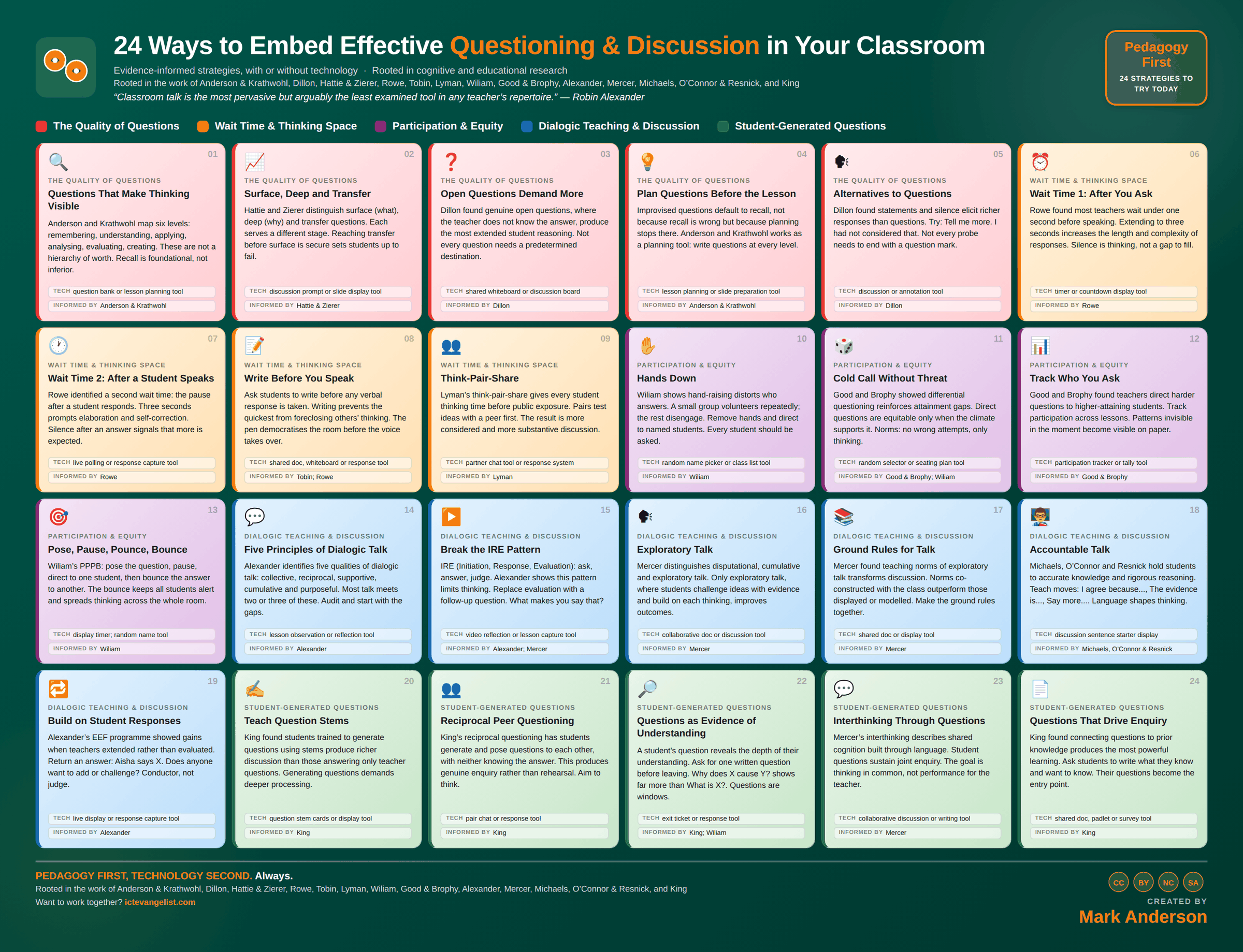
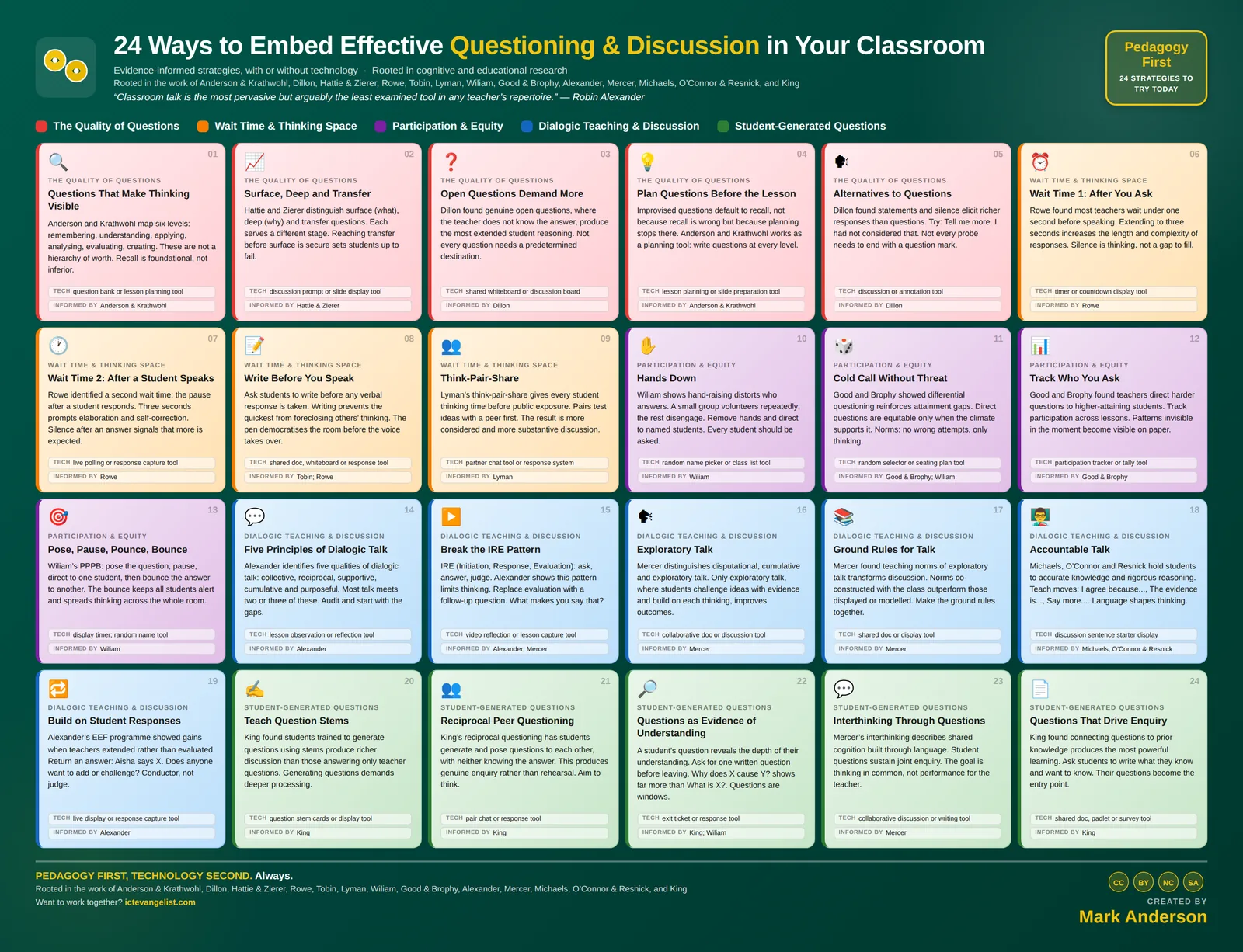
The infographic this chapter expands

The Questioning & Discussion infographic: 24 strategies laid out in colour coded groups, each with a title, a short description, a suggested technology and the researchers behind it. Every strategy is written out in full further down this page.
All 24 on one page. Download the full size image for printing or sharing, or read every strategy expanded below.

The thinking

Why these strategies

A classroom runs on its questions. Change the questions and you change the thinking.

Robin Alexander’s work on dialogic teaching showed us that talk is not the decoration around learning, it is often the medium of it. The problem is that classroom talk can easily become too thin, too quick, and too dependent on the teacher.

Neil Mercer’s work on exploratory talk helps here, because it shows what better classroom discussion looks like when pupils reason together, build on each other’s ideas and make their thinking public. Mary Budd Rowe’s work on wait time adds another important reminder: a few seconds of silence after a question can change the quality of what follows.

The strategies in this section move from better questions to better talk to the routines that help every voice count.

Silence after a question is not dead air; it is where better thinking often begins.

In practice

Where technology serves

Technology can widen who gets to speak, but the thinking still has to belong to the student.

Anonymous response tools, shared documents and structured digital discussion can bring in students who might never raise a hand. That matters. They also give the class something to come back to, so a useful conversation does not disappear the moment the lesson moves on.

The risk, especially with AI, is that the tool answers the question students should be wrestling with. A good question slows thinking down. It gives students something to try, explain, challenge, refine and improve. When the tool removes that struggle, it can remove the learning too.

Use technology to bring more voices into the room, not to take the thinking out of it.
Knowing whether it worked

How would you know?

Who speaks, and for how long.

This one is genuinely countable. Tally who gets asked over a fortnight and the type of question each student receives. Time a few student answers: if mean response length is rising, wait time is doing its work. A colleague with a tally sheet at the back will tell you more in twenty minutes than a term of self-report.

The Quality of Questions

5 strategies

Anderson and Krathwohl map six levels: remembering, understanding, applying, analysing, evaluating, creating. These are not a hierarchy of worth. Recall is foundational, not inferior.

Anderson and Krathwohl's revision of Bloom sets out six cognitive processes: remembering, understanding, applying, analysing, evaluating and creating. It's a planning tool for questions, not a ladder to climb.

Why it works

The common misreading treats recall as the low-value bottom rung to be escaped as fast as possible. It is not. Analysis without secure knowledge produces confident nonsense, and Willingham's point that you can't think critically about content you don't know applies directly. The taxonomy is useful for making sure your questions span the range, not for ranking them by worth.

How to run it

  1. Take a topic and write one question at each of the six levels.
  2. Notice which levels you find hard to write for. That is usually where your questioning is thin.
  3. Sequence them so the knowledge questions come before the ones that depend on that knowledge.
  4. Keep returning to remembering later in the unit, not just at the start.

Where technology serves

A question bank organised by level makes the range visible and stops the same three question types recurring across a unit.

Watch for: Treating the top three levels as the real teaching and recall as a warm-up produces students who can evaluate a topic they can't describe.

Techquestion bank or lesson planning toolInformed byAnderson & Krathwohl

Hattie and Zierer distinguish surface (what), deep (why) and transfer questions. Each serves a different stage. Reaching transfer before surface is secure sets students up to fail.

Hattie and Zierer separate surface questions, which establish what, deep questions, which establish why and how, and transfer questions, which ask students to apply the idea somewhere new.

Why it works

Each type suits a different point in a sequence, and the common failure is reaching for transfer too early. A student who can't yet explain the mechanism won't transfer it to an unfamiliar context; they'll pattern-match on surface features and get it wrong. Knowing which type you're asking tells you whether a poor answer means reteach or means keep going.

How to run it

  1. Label your planned questions surface, deep or transfer.
  2. Check the sequence moves in that order within a topic.
  3. Do not abandon surface questions once you've moved on. Interleave them back in.
  4. When transfer questions fail, drop back to deep rather than repeating the transfer.

Where technology serves

A slide or prompt display that keeps the question visible while students think reduces the load of holding a complex question in working memory.

Watch for: Deep questions asked of a class that hasn't secured the surface knowledge produce silence, which then gets misread as a discussion problem.

Techdiscussion prompt or slide display toolInformed byHattie & Zierer

Dillon found genuine open questions, where the teacher does not know the answer, produce the most extended student reasoning. Not every question needs a predetermined destination.

A genuinely open question is one where you don't already have the answer in mind. Not a guess-what-I-am-thinking question with a wide opening.

Why it works

Dillon's classroom research found that authentic questions, where the teacher was genuinely uncertain, produced markedly longer and more reasoned student responses. Students detect the difference quickly. When they sense a target answer, the task becomes finding it rather than thinking, and the reasoning shortens accordingly.

How to run it

  1. Plan two or three genuinely open questions per unit, where multiple defensible answers exist.
  2. Do not evaluate the first answer. Collect several before responding to any.
  3. Let disagreement stand for a while rather than resolving it immediately.
  4. Be honest when you do have an answer in mind. Pseudo-open questions damage trust.

Where technology serves

A shared whiteboard or discussion board lets several answers exist at once, which is much harder to achieve in a sequence of spoken turns.

Watch for: Not every question should be open. Factual questions with one right answer are doing important work and should be asked as such.

Techshared whiteboard or discussion boardInformed byDillon

Improvised questions default to recall, not because recall is wrong but because planning stops there. Anderson and Krathwohl works as a planning tool: write questions at every level.

Write your key questions before the lesson rather than generating them in the moment.

Why it works

Improvised questions default to recall, not because teachers undervalue thinking but because recall questions are the ones you can compose while also managing a room. Planning three or four questions in advance is one of the highest-return preparation tasks available, and it takes a couple of minutes.

How to run it

  1. Plan three or four questions per lesson, not thirty.
  2. Write them where you'll see them: on the slide, in the margin of the plan.
  3. Include at least one you expect the class to find difficult.
  4. Note what a wrong answer to each would tell you.

Where technology serves

Putting the questions on the slides means they're prepared, visible to students, and reusable next year.

Watch for: Planned questions still need responsive follow-ups. The plan is a floor for the quality of questioning, not a script to be read.

Techlesson planning or slide preparation toolInformed byAnderson & Krathwohl

Dillon found statements and silence elicit richer responses than questions. Try: Tell me more. I had not considered that. Not every probe needs to end with a question mark.

Not every probe needs to be a question. Statements, invitations and silence often produce more than another question does.

Why it works

Dillon found that non-question alternatives produced longer, more elaborated student responses than questions did. A question implies a specific answer is wanted and narrows the response. Tell me more, or a declarative statement offered for the class to react to, opens the space rather than closing it.

How to run it

  1. Try a statement: I hadn't thought of it that way.
  2. Try an invitation: say more about that.
  3. Try silence. Count to five after an answer before speaking.
  4. Try reflecting back what was said and stopping.

Where technology serves

This is mostly a talk technique. Where technology helps is in recording a lesson so you can hear how often you ask versus how often you wait.

Watch for: Silence is only productive if the class knows what it's for. Establish that a pause is thinking time, or it will be filled with fidgeting.

Techdiscussion or annotation toolInformed byDillon

Wait Time & Thinking Space

4 strategies

Rowe found most teachers wait under one second before speaking. Extending to three seconds increases the length and complexity of responses. Silence is thinking, not a gap to fill.

The pause between asking a question and expecting an answer. Rowe found most teachers wait under a second; three seconds changes what comes back.

Why it works

Rowe's studies found that extending wait time to three seconds produced longer responses, more evidence and reasoning, more students volunteering, and fewer failures to respond. The mechanism is straightforward: complex answers take time to compose, and a one-second wait selects for whoever has an answer already, which isn't the same as whoever is thinking hardest.

How to run it

  1. Ask, then count silently to three before taking any answer.
  2. Tell the class you're doing it, so the silence is understood.
  3. Resist rephrasing during the pause. Rephrasing restarts the clock.
  4. Notice how uncomfortable it feels at first. It gets easier.

Where technology serves

A visible timer or countdown makes the wait a shared expectation rather than a test of your nerve.

Watch for: Wait time is the first thing to disappear when a lesson is running late, and it's the change most likely to improve the quality of answers.

Techtimer or countdown display toolInformed byRowe

Rowe identified a second wait time: the pause after a student responds. Three seconds prompts elaboration and self-correction. Silence after an answer signals that more is expected.

The second pause: after a student finishes speaking, before you respond. Also around three seconds.

Why it works

Rowe identified this as the more neglected of the two and in some ways the more powerful. The pause after an answer prompts the student to elaborate, qualify or correct themselves, and signals to the room that more is expected. Filling it with an immediate evaluation ends the thinking at the first answer.

How to run it

  1. When a student stops, do not speak. Count to three.
  2. Hold eye contact so the pause reads as interest rather than disapproval.
  3. Notice how often they add something unprompted.
  4. Only then respond, and prefer a follow-up question to an evaluation.

Where technology serves

Recording a lesson and listening back is the fastest way to find out how long you actually wait, which is almost always less than you think.

Watch for: A pause that reads as displeasure will silence a student rather than extend them. Your face is doing as much work here as the silence.

Techlive polling or response capture toolInformed byRowe

Ask students to write before any verbal response is taken. Writing prevents the quickest from foreclosing others’ thinking. The pen democratises the room before the voice takes over.

Ask everyone to write an answer before any verbal response is taken.

Why it works

Tobin's and Rowe's work on wait time points to the same underlying problem: the fastest student in the room sets the terms of the discussion. Writing first gives every student a position to hold. It also means that when you nominate, the student has something to read from, which removes most of the fear of being asked.

How to run it

  1. Pose the question, then require writing before hands or nominations.
  2. Keep it short. A sentence is enough.
  3. Nominate after the writing, not before.
  4. Occasionally ask a student to read exactly what they wrote, including if they've changed their mind since.

Where technology serves

A shared document, whiteboard or response tool lets you see the range of positions before the discussion starts, which changes who you choose to bring in.

Watch for: For students with significant writing difficulties, requiring writing can create the barrier it was meant to remove. Allow a drawn or dictated equivalent.

Techshared doc, whiteboard or response toolInformed byTobin; Rowe

Lyman’s think-pair-share gives every student thinking time before public exposure. Pairs test ideas with a peer first. The result is more considered and more substantive discussion.

Lyman's structure: think alone, discuss in pairs, then share with the class. All three stages, in order.

Why it works

The individual stage protects thinking time; the pair stage lets an idea be tested cheaply before public exposure; the share stage makes it accountable. It's one of the most widely used structures in teaching and one of the most frequently degraded, usually by dropping the first stage and turning it into unstructured chat.

How to run it

  1. Time each stage visibly. Think is silent.
  2. Give the pair stage a task: agree an answer, or find where you differ.
  3. Nominate for the share rather than taking volunteers.
  4. Ask for the pair's position, which shares the exposure between two.

Where technology serves

A timer matters more than any dedicated tool here. Partner chat tools help when students are working remotely or in a large space.

Watch for: Without the silent think, the confident partner's first idea becomes the pair's answer and the structure has achieved nothing.

Techpartner chat tool or response systemInformed byLyman

Participation & Equity

4 strategies
10

Hands Down

Wiliam shows hand-raising distorts who answers. A small group volunteers repeatedly; the rest disengage. Remove hands and direct to named students. Every student should be asked.

Stop taking hands. Direct questions to named students instead, with the norm established in advance.

Why it works

Wiliam's argument is that hands up creates a self-selecting minority who answer everything while the rest opt out, and that the opting out is invisible because the lesson appears to be going well. Removing hands makes participation a matter of your design rather than of student confidence, which isn't evenly distributed.

How to run it

  1. Explain the change and why, before you start.
  2. Pair it with wait time and with write-first, so being named isn't an ambush.
  3. Allow a pass with a return: I will come back to you.
  4. Track who you've asked so the distribution is real rather than felt.

Where technology serves

A random name picker or class list tool removes unconscious bias in selection and makes the tracking automatic.

Watch for: Hands down without a supportive climate is exposure. The technique depends entirely on the norm that not knowing yet is acceptable.

Techrandom name picker or class list toolInformed byWiliam

Good and Brophy showed differential questioning reinforces attainment gaps. Direct questions are equitable only when the climate supports it. Norms: no wrong attempts, only thinking.

Direct questions to any student, in a climate where a wrong answer costs nothing and thinking aloud is expected.

Why it works

Good and Brophy documented differential teacher questioning: higher-attaining students receive more, harder and more probing questions, and are given more time to answer. Cold calling is only equitable if the climate supports it. In a threatening room it amplifies the gap it was meant to close.

How to run it

  1. Build the norms first: attempts are expected, not knowing yet is normal, we finish each other's thinking.
  2. Ask the same quality of question of every student.
  3. When an answer is wrong, work with it rather than moving on to someone else.
  4. Return to a student who passed, so the pass isn't an exit.

Where technology serves

A random selector paired with a seating plan keeps selection visibly fair, which matters to students more than teachers often expect.

Watch for: Cold calling in a room where wrong answers get laughed at teaches students to stay silent, and the laughter is your responsibility to remove first.

Techrandom selector or seating plan toolInformed byGood & Brophy; Wiliam

Good and Brophy found teachers direct harder questions to higher-attaining students. Track participation across lessons. Patterns invisible in the moment become visible on paper.

Keep a record of who you ask, what you ask them, and how long you give them.

Why it works

Good and Brophy's finding is that the pattern is invisible from inside the lesson. Teachers believe they distribute questions evenly and the tallies say otherwise, consistently. Nothing changes the distribution as reliably as writing it down for a fortnight.

How to run it

  1. Tally names against questions for two weeks.
  2. Note the type of question, not just the count.
  3. Look for who is missing and who only ever gets recall.
  4. Redesign your next unit's questioning around the gaps.

Where technology serves

A tracker or tally tool tied to your seating plan makes this survivable. Paper tallies work for a fortnight and rarely longer.

Watch for: Counting questions alone can flatter you. The type of question matters more than the number, and that's where the gap usually sits.

Techparticipation tracker or tally toolInformed byGood & Brophy

Wiliam’s PPPB: pose the question, pause, direct to one student, then bounce the answer to another. The bounce keeps all students alert and spreads thinking across the whole room.

Pose the question to everyone, pause for thinking, pounce on a named student, then bounce their answer to another student to extend or challenge.

Why it works

Wiliam's structure keeps the whole class cognitively engaged because the bounce means any answer might land with anyone. It also breaks the teacher-student-teacher pattern that dominates most classroom talk, and it puts the evaluation of an answer into student hands rather than yours.

How to run it

  1. Pose to the room. Do not name first, or everyone else disengages.
  2. Pause. Three seconds minimum.
  3. Pounce on a named student.
  4. Bounce: do you agree with that, and why? Then bounce again.

Where technology serves

A random name tool and a visible timer support the pounce and pause. The bounce is entirely a matter of your habit.

Watch for: Bouncing only to strong students to rescue an answer turns the technique into a repair mechanism and tells the class who is trusted.

Techdisplay timer; random name toolInformed byWiliam

Dialogic Teaching & Discussion

6 strategies

Alexander identifies five qualities of dialogic talk: collective, reciprocal, supportive, cumulative and purposeful. Most talk meets two or three of these. Audit and start with the gaps.

Why it works

The five are useful as an audit because most classroom talk satisfies two or three. Talk is often collective and supportive and rarely cumulative, meaning ideas don't build across turns. Naming which criterion is missing gives you something specific to change rather than a general aspiration to have better discussions.

How to run it

  1. Record or have a colleague observe fifteen minutes of your talk.
  2. Score it against the five criteria honestly.
  3. Pick the weakest and design for it specifically for a fortnight.
  4. Cumulative is usually the one to work on first.

Where technology serves

A lesson recording or observation tool gives you the evidence. Self-report on classroom talk is unreliable, including for very experienced teachers.

Watch for: Aiming at all five at once produces no change. One criterion, one fortnight.

Techlesson observation or reflection toolInformed byAlexander

IRE (Initiation, Response, Evaluation): ask, answer, judge. Alexander shows this pattern limits thinking. Replace evaluation with a follow-up question. What makes you say that?

Initiation, Response, Evaluation is the default pattern of classroom talk: teacher asks, student answers, teacher judges. Replacing the evaluation with a follow-up question changes what the talk does.

Why it works

Alexander and Mercer both identify IRE as the dominant and most limiting pattern. The evaluation closes the exchange: the answer has been judged, so there's nothing more to think about. Substituting a question keeps the thinking open and hands the next move back to the students.

How to run it

  1. After an answer, ask what makes you say that, rather than saying good.
  2. Or hand it on: what does anyone else think about that?
  3. Withhold your judgement until several contributions have accumulated.
  4. Record yourself and count how many exchanges end in your evaluation.

Where technology serves

Video reflection or lesson capture is the only reliable way to see your own IRE rate, because it's almost invisible from the front of the room.

Watch for: Never evaluating is its own problem. Students need to know when something is right; the point isn't to end every exchange that way.

Techvideo reflection or lesson capture toolInformed byAlexander; Mercer

Mercer distinguishes disputational, cumulative and exploratory talk. Only exploratory talk, where students challenge ideas with evidence and build on each thinking, improves outcomes.

Why it works

Only exploratory talk is associated with improved outcomes, and it's the rarest of the three. Groups left to themselves default to cumulative, which looks collaborative and involves very little thinking. The distinction is worth teaching to students directly, because they can recognise which one they're doing.

How to run it

  1. Teach the three types explicitly, with examples of each.
  2. Give sentence stems that force reasons: I disagree because, the evidence for that's.
  3. Listen for challenge. If there is none, the group is being cumulative.
  4. Ask groups to self-identify which type they were doing.

Where technology serves

Collaborative documents leave a trace of the reasoning, which lets you see whether challenge occurred rather than guessing from noise level.

Watch for: A quiet, agreeable group is often doing the least thinking in the room. Do not read harmony as productivity.

Techcollaborative doc or discussion toolInformed byMercer

Mercer found teaching norms of exploratory talk transforms discussion. Norms co-constructed with the class outperform those displayed or modelled. Make the ground rules together.

Ground rules for talk, agreed with the class rather than displayed to them: how we disagree, how we give reasons, how we make sure everyone contributes.

Why it works

Mercer's research found that explicitly teaching the ground rules of exploratory talk transformed the quality of group discussion, and that co-constructed rules outperformed rules that were given. Students who have argued about what a fair discussion looks like are considerably more likely to hold each other to it.

How to run it

  1. Discuss what makes a good discussion before you set any group work.
  2. Draft the rules from their language and keep it to five or six.
  3. Display them and refer to them by number during group work.
  4. Revisit and revise them when they stop being followed.

Where technology serves

A shared document keeps the rules editable and lets students revise them, which matters if you want them to stay theirs.

Watch for: Rules that were co-constructed in September and never mentioned again become wallpaper by half term.

Techshared doc or display toolInformed byMercer
18

Accountable Talk

Michaels, O’Connor and Resnick hold students to accurate knowledge and rigorous reasoning. Teach moves: I agree because..., The evidence is..., Say more.... Language shapes thinking.

Michaels, O'Connor and Resnick's accountable talk: students are held accountable to the learning community, to accurate knowledge, and to rigorous reasoning. Specific talk moves make this teachable.

Why it works

The framework is useful because it names the moves rather than the aspiration. I agree because, the evidence is, can you say more, I want to build on what X said. These are learnable phrases that carry the reasoning with them, and students who use them are structurally more likely to give reasons.

How to run it

  1. Teach four or five talk moves explicitly and display them.
  2. Model each one yourself in whole-class discussion.
  3. Require their use in group work initially, then let it become natural.
  4. Praise the move when you hear it, so the class notices it working.

Where technology serves

A sentence-starter display keeps the moves visible during discussion, which is when students need them and can't recall them.

Watch for: Talk moves recited without the thinking behind them become a formula. Push past I agree because to what the reason actually is.

Techdiscussion sentence starter displayInformed byMichaels, O’Connor & Resnick

Alexander’s EEF programme showed gains when teachers extended rather than evaluated. Return an answer: Aisha says X. Does anyone want to add or challenge? Conductor, not judge.

Take a student's answer and hand it back to the class to extend, challenge or connect, rather than evaluating it yourself.

Why it works

Alexander's dialogic teaching trial with the EEF found gains in English, maths and science, and the mechanism at the heart of it is teachers extending rather than evaluating. Returning an answer to the room positions you as the conductor of the thinking rather than the judge of it, and it makes listening to each other necessary rather than optional.

How to run it

  1. Name the contribution: Aisha said X.
  2. Hand it on: who can add to that, or who sees it differently?
  3. Insist on engagement with the actual point, not a fresh answer.
  4. Return to the original student at the end to respond.

Where technology serves

A live display of contributions helps students track what has been said, which is what makes building on it possible in a long discussion.

Watch for: Handing on an answer that was wrong, without eventually resolving it, leaves the misconception in the room with a class that can't tell.

Techlive display or response capture toolInformed byAlexander

Student-Generated Questions

5 strategies

King found students trained to generate questions using stems produce richer discussion than those answering only teacher questions. Generating questions demands deeper processing.

Teach students the stems for generating their own questions: why does, what would happen if, how does X compare with Y.

Why it works

King's research found that students trained to generate questions using stems produced better discussion and better comprehension than students who only answered teacher questions. Writing a good question makes you work out what's worth asking, which is a good deal harder than answering one you've been handed.

How to run it

  1. Give a small set of stems, five or six, and display them.
  2. Model generating questions from a text or a diagram yourself.
  3. Require a specific mix: one why, one what if, one comparison.
  4. Use the best of their questions in the next lesson, credited.

Where technology serves

Question stem cards or a display keep the stems available at the point of use, which is where the scaffold does its work.

Watch for: Without stems, most students generate recall questions, and conclude that question generation is a low-value task.

Techquestion stem cards or display toolInformed byKing

King’s reciprocal questioning has students generate and pose questions to each other, with neither knowing the answer. This produces genuine enquiry rather than rehearsal. Aim to think.

Why it works

King's reciprocal peer questioning produces genuine enquiry rather than rehearsal, because there's no answer key to converge on. The questioner has to judge whether an answer is adequate, which requires them to understand the material at least as well as the responder. Both roles are cognitively demanding, which is the point.

How to run it

  1. Teach the stems first. This does not work cold.
  2. Pair students and give each a section of content to question the other on.
  3. Require follow-up questions, not just an exchange of one question each.
  4. Circulate and listen for the quality of the questions rather than the answers.

Where technology serves

Pair chat or response tools keep a record of the exchange, which lets you review the questioning quality after the lesson.

Watch for: Pairs of similar attainment can converge on a shared misconception with nobody in the room to notice. Circulate purposefully.

Techpair chat or response toolInformed byKing

A student’s question reveals the depth of their understanding. Ask for one written question before leaving. Why does X cause Y? shows far more than What is X?. Questions are windows.

Use the questions students ask as evidence of understanding. Ask for one written question at the end of a lesson.

Why it works

A question reveals the edge of what someone knows. Why does X cause Y demonstrates a grasp of the relationship; what is X demonstrates that the basics haven't landed. King's work on question generation and Wiliam's on eliciting evidence meet here: the question is diagnostic data that costs two minutes to collect.

How to run it

  1. One written question at the end of the lesson, from everyone.
  2. Sort them into recall, explanation and application before the next lesson.
  3. The distribution tells you where the class actually is.
  4. Answer the best ones publicly and credit them.

Where technology serves

An exit ticket or response tool collects and sorts thirty questions in the time it takes to gather thirty slips of paper.

Watch for: Students who have learned that questions signal weakness will write safe ones. The climate has to make curiosity look like competence.

Techexit ticket or response toolInformed byKing; Wiliam

Mercer’s interthinking describes shared cognition built through language. Student questions sustain joint enquiry. The goal is thinking in common, not performance for the teacher.

Mercer's interthinking: the shared cognition that happens when a group genuinely thinks together through language, rather than dividing the task up.

Why it works

The concept is useful because it names what good group work is for. If the outcome could have been produced by one person working alone, the group added nothing. Student questions sustain joint enquiry because they keep the group working on the same problem rather than on parallel fragments of it.

How to run it

  1. Set tasks that genuinely require more than one mind, not tasks that can be split.
  2. Require a shared product that everyone can explain.
  3. Ask any group member to account for the group's reasoning.
  4. Value the questions the group asked as much as the answer it reached.

Where technology serves

Collaborative writing tools show whether thinking was shared or divided, because the edit history makes the division visible.

Watch for: Group tasks that decompose neatly into individual chunks produce efficient division of labour and no interthinking at all.

Techcollaborative discussion or writing toolInformed byMercer

King found connecting questions to prior knowledge produces the most powerful learning. Ask students to write what they know and want to know. Their questions become the entry point.

Use student questions to open a topic. What do you already know, and what do you want to know, becomes the entry point for the enquiry.

Why it works

King found that connecting new questions to prior knowledge produced the strongest learning effects. Starting from what students actually wonder about does two things at once: it activates the prior knowledge you need them to connect to, and it tells you where their existing understanding is, before you've taught anything.

How to run it

  1. Open a topic by collecting what they know and what they want to know.
  2. Sort their questions into ones the unit will answer and ones it won't.
  3. Display the list and tick them off as the unit progresses.
  4. Return to the unanswered ones at the end and decide together what to do with them.

Where technology serves

A shared board or survey tool collects thirty contributions in two minutes and keeps them visible for the length of the unit.

Watch for: Collecting student questions and then teaching the unit exactly as planned, without reference to them, teaches the class that their questions are decorative.

Techshared doc, padlet or survey toolInformed byKing

Want this thinking in your school?

I run keynotes, INSET and workshops on pedagogy, AI and digital strategy, and I work with schools and trusts over time rather than one day and gone. Tell me where your team is and I'll tell you honestly whether I can help.

Back to top