Chapter Three of six

Feedback

Feedback is too often treated as another word for marking. It isn’t. Good feedback gives pupils information they can use to improve what they do next, and that is a far higher bar than writing a comment in the margin.

Rooted in the work of Hattie & Timperley, Sadler, Butler, Nicol & Macfarlane-Dick, Wiliam, Kluger & DeNisi, Shute, Topping, Andrade, Carless and Boud

Feedback is one of the most powerful influences on learning and achievement, but this impact can be either positive or negative.

Hattie & Timperley, 2007

24 strategies5 groupsabout 25 minutes to read

The original

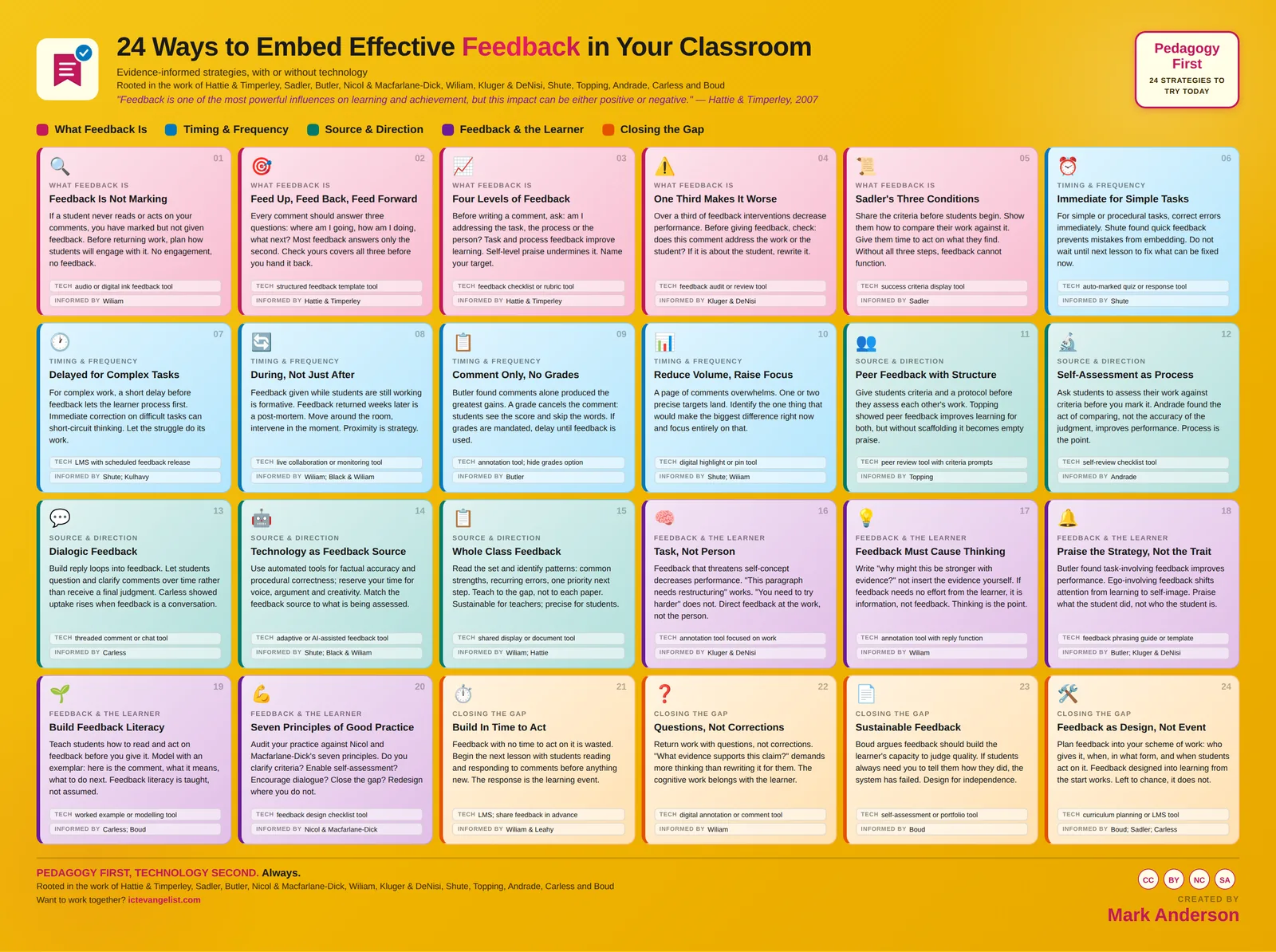
The infographic this chapter expands

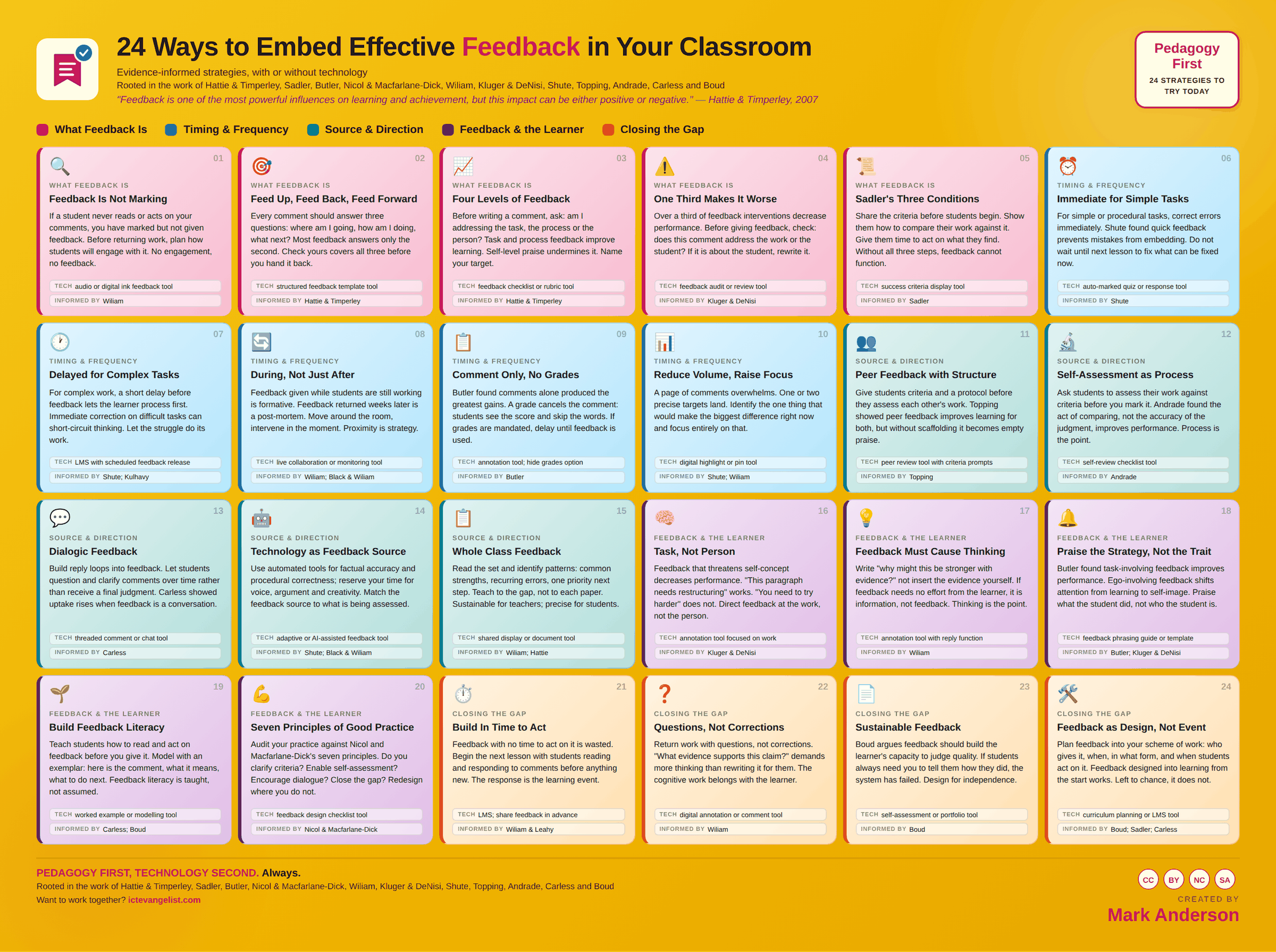
The Feedback infographic: 24 strategies laid out in colour coded groups, each with a title, a short description, a suggested technology and the researchers behind it. Every strategy is written out in full further down this page.
All 24 on one page. Download the full size image for printing or sharing, or read every strategy expanded below.

The thinking

Why these strategies

Feedback is not what the teacher gives. It is what the learner does with it.

Hattie and Timperley’s work showed us that feedback can have a powerful effect on achievement, but it is not automatically useful. Some feedback helps, some does very little, and some can make things worse.

Sadler’s work found the important bit that is often missed. Feedback only works when learners understand what quality looks like, can compare their work against it, and know how to close the gap. Nicol and Macfarlane Dick took this further by placing feedback within self-regulation, helping pupils become better at judging and improving their own work.

Butler’s study is a useful warning too. When grades sit alongside comments, pupils often look at the grade and miss the guidance.
In practice

Where technology serves

Technology can make feedback faster. That only matters if pupils use it.

Digital annotation, audio comments and shared documents can shorten the gap between work and response to almost nothing. That matters. Feedback given while the work is still fresh has a far better chance of shaping what pupils do next than feedback returned two weeks later.

Used well, the same tools also make whole-class feedback more manageable. You can spot common patterns, address them quickly, and avoid writing the same comment thirty times.

The trap is automated feedback that gives a score, a tick, or a badge and stops there. That may be useful information, but it is ultimately unhelpful. Feedback earns its keep when pupils have time to think, improve, redraft, correct, compare or try again.

The win is not faster feedback. The win is better work because pupils had time to use it.
Knowing whether it worked

How would you know?

What students do next, not what you wrote.

Look at the work after the feedback, not the feedback itself. Sample a set and count how many pieces show a specific response to a specific comment. Time is the other measure worth having: marking hours per class per week, before and after moving to whole-class feedback, alongside whether the response rate held up.

What Feedback Is

5 strategies

If a student never reads or acts on your comments, you have marked but not given feedback. Before returning work, plan how students will engage with it. No engagement, no feedback.

Marking is what you do to a piece of work. Feedback is what the student does next as a result. If nothing happens after the comment, you have marked.

Why it works

Wiliam's distinction matters because most workload debates are about marking while most learning gains come from the response. A comment that's never read, or read and not acted on, has cost you time and changed nothing. Planning the response before you write the comment reverses the usual order and is far more efficient.

How to run it

  1. Before marking a set, decide how students will engage with what you write.
  2. Timetable that engagement. If there's no slot for it, don't write the comments.
  3. Give a specific action, not a judgement.
  4. Check the actions happened. This is the step that makes students take the rest seriously.

Where technology serves

Audio or digital ink feedback is often faster to produce and easier for students to follow than handwriting, particularly on longer pieces where the comment needs to reference specific points.

Watch for: A marking policy that specifies frequency and format but says nothing about student response is a policy about marking, not about feedback.

Techaudio or digital ink feedback toolInformed byWiliam

Every comment should answer three questions: where am I going, how am I doing, what next? Most feedback answers only the second. Check yours covers all three before you hand it back.

Why it works

Hattie and Timperley's model is useful precisely because it exposes the imbalance. Comments cluster around evaluation of the current work. Without the goal restated, the student can't judge the gap; without the next step, they can't close it. All three together turn a comment into something actionable.

How to run it

  1. Check any comment against all three before it goes back.
  2. Feed up can be brief: a reference to the shared criteria is enough.
  3. Feed back should point at evidence in the work, not offer a general impression.
  4. Feed forward should be one specific thing to do, not a list.

Where technology serves

A structured feedback template with three prompts makes the omission visible while you're writing, which is when it can be fixed.

Watch for: Three sections becoming three sentences of filler is worse than one good sentence. The structure is a check, not a quota.

Techstructured feedback template toolInformed byHattie & Timperley

Before writing a comment, ask: am I addressing the task, the process or the person? Task and process feedback improve learning. Self-level praise undermines it. Name your target.

Feedback lands at one of four levels: the task, the process, the student's self-regulation, or the person. The first three help. The fourth does not.

Why it works

Hattie and Timperley found task and process feedback most effective for improving work, self-regulation feedback powerful for developing independent learners, and self-level feedback, praise directed at the person, largely ineffective and sometimes harmful. Naming which level you're aiming at before you write is a fast way to raise the quality.

How to run it

  1. Ask before writing: am I talking about the work, the method, their learning behaviours, or them?
  2. Rewrite anything at the person level. Well done you becomes what specifically worked.
  3. Use process feedback when the task is understood but the approach is inefficient.
  4. Use self-regulation feedback when the student can already judge quality but isn't doing it.

Where technology serves

A feedback checklist or rubric tool with the four levels on it makes the categorisation a two-second check rather than an act of recall.

Watch for: Praise is not banned. It is just not feedback. Warmth in a relationship and information about the work are different things and both are needed.

Techfeedback checklist or rubric toolInformed byHattie & Timperley
04

One Third Makes It Worse

Over a third of feedback interventions decrease performance. Before giving feedback, check: does this comment address the work or the student? If it is about the student, rewrite it.

Feedback is not automatically beneficial. A substantial proportion of feedback interventions make performance worse.

Why it works

Kluger and DeNisi's meta-analysis of over six hundred studies found that around a third of feedback interventions decreased performance. The pattern was clearest where feedback drew attention to the self rather than the task. This is the single most useful corrective to the assumption that more feedback is always better.

How to run it

  1. Before returning work, reread your comments as the student.
  2. Anything that reads as a judgement of them rather than the work gets rewritten.
  3. Watch for comparison to others, explicit or implied.
  4. Where a comment cannot be acted on, cut it.

Where technology serves

A feedback audit, even an informal one where you sample your own comments once a term, is more useful than any tool. Digital records make the sampling easy.

Watch for: The comments most likely to do harm are often the ones written quickly at the end of a long set, when patience is thin. Mark the hardest scripts first.

Techfeedback audit or review toolInformed byKluger & DeNisi

Share the criteria before students begin. Show them how to compare their work against it. Give them time to act on what they find. Without all three steps, feedback cannot function.

Sadler set out three conditions for feedback to work: the student must know the standard, be able to compare their work to it, and have the means to close the gap. All three, or none of it functions.

Why it works

The conditions explain most feedback failures. Students who don't know the standard can't interpret the comment. Students who can't compare can't see the gap you're describing. Students with no time or means to act can't close it. Diagnosing which condition is missing is more productive than writing more comments.

How to run it

  1. Share and unpack the criteria before students start, not when you return the work.
  2. Teach the comparison explicitly, using exemplars.
  3. Provide the time and the route to act.
  4. When feedback isn't landing, work out which of the three is missing before rewriting comments.

Where technology serves

A success criteria display tool keeps the standard visible during the work and during the response, which is when students most need it.

Watch for: Handing out criteria isn't the same as sharing the standard. Students can read a rubric and still not recognise quality when they see it.

Techsuccess criteria display toolInformed bySadler

Timing & Frequency

5 strategies

For simple or procedural tasks, correct errors immediately. Shute found quick feedback prevents mistakes from embedding. Do not wait until next lesson to fix what can be fixed now.

For simple, procedural or factual work, correct errors quickly, before they get practised.

Why it works

Shute's review found immediate feedback most effective for lower-level tasks, where an uncorrected error simply becomes a rehearsed error. There's no productive struggle to protect in the spelling of a technical term or the sign convention in a calculation. Waiting a week to correct it means a week of practising it wrongly.

How to run it

  1. Build immediate correction into practice tasks rather than saving it for marking.
  2. Circulate during independent work and correct at the point of error.
  3. Use self-marking for the procedural parts so students see errors within seconds.
  4. Reserve your own time for the parts that need judgement.

Where technology serves

Auto-marked quizzes and response tools are genuinely good at this, and they free you to work on the parts a machine can't judge.

Watch for: Applying the same immediacy to complex reasoning removes the thinking. The rule is task-dependent, not a general preference for speed.

Techauto-marked quiz or response toolInformed byShute

For complex work, a short delay before feedback lets the learner process first. Immediate correction on difficult tasks can short-circuit thinking. Let the struggle do its work.

For complex work, leave a gap between the attempt and the feedback so the learner has processed it first.

Why it works

Shute, drawing on Kulhavy among others, found delayed feedback more effective for complex tasks and transfer. Correcting a student mid-thought on a difficult problem interrupts the very reasoning you want them to develop. The delay lets them commit to an approach, which is what makes the subsequent feedback meaningful.

How to run it

  1. On extended or open tasks, let the attempt finish before you intervene.
  2. Resist answering questions that the student is close to resolving themselves.
  3. Schedule the feedback for the following lesson rather than the same one.
  4. Tell students the delay is deliberate, so it doesn't read as slow marking.

Where technology serves

An LMS with scheduled feedback release lets you write it while it's fresh and deliver it when it will be most useful.

Watch for: Delay is not the same as neglect. Feedback that arrives three weeks later, when the class has moved on, is a post-mortem whatever the theory says.

TechLMS with scheduled feedback releaseInformed byShute; Kulhavy

Feedback given while students are still working is formative. Feedback returned weeks later is a post-mortem. Move around the room, intervene in the moment. Proximity is strategy.

Feedback given while students are still working is formative. Feedback given after the work is finished and moved on from is a report.

Why it works

Black and Wiliam's central case for formative assessment is about the timing of the information relative to the decision it should influence. A comment that arrives while the work can still change is worth several that arrive afterwards. Circulating during independent work is the highest-yield feedback slot in most lessons, and it costs no marking time at all.

How to run it

  1. Plan where you'll be during independent work rather than drifting.
  2. Prioritise the students whose approach will go wrong early.
  3. Keep interventions short and specific. One thing.
  4. Note recurring issues and address them to the whole class rather than thirty times.

Where technology serves

Live collaboration tools let you see several pieces of work developing at once, which extends how many students you can reach in the same time.

Watch for: Circulating without a plan means seeing the students who put their hand up, who are rarely the ones most in need.

Techlive collaboration or monitoring toolInformed byWiliam; Black & Wiliam

Butler found comments alone produced the greatest gains. A grade cancels the comment: students see the score and skip the words. If grades are mandated, delay until feedback is used.

Comments alone on formative work. No grade, or a grade delayed until the feedback has been used.

Why it works

Butler's experiment gave three groups comments, grades, or both. Comments alone produced the largest gains; grades alone produced none; both together performed like grades alone. The grade appears to switch attention from the task to the self and to comparison with peers, which is exactly the shift Kluger and DeNisi found to be damaging.

How to run it

  1. Identify which pieces are genuinely formative and remove grades from those.
  2. Where a grade is required, record it and release it after the response.
  3. Explain the reasoning to students and parents in advance.
  4. Keep the practice consistent, or students will hunt for the grade anyway.

Where technology serves

Annotation tools and LMS platforms usually have an option to hide grades until a set point. It's rarely the default; you'll need to turn it on.

Watch for: A comment plus a grade in the same envelope has the same effect as a grade alone. If policy requires the grade, the separation has to be real.

Techannotation tool; hide grades optionInformed byButler

A page of comments overwhelms. One or two precise targets land. Identify the one thing that would make the biggest difference right now and focus entirely on that.

Fewer comments, more precisely aimed. One or two things that would make the biggest difference, rather than everything that could be improved.

Why it works

Shute and Wiliam both point to the cognitive load problem: a page covered in comments gives the student no basis for deciding where to start, so many start nowhere. Working out the one change that would make the biggest difference is harder work for you and far more useful for them.

How to run it

  1. Read the whole piece before writing anything.
  2. Ask what one change would most improve the next piece.
  3. Write that. Resist the rest.
  4. Keep a note of the others for whole-class teaching if they recur.

Where technology serves

A digital highlight or pin tool lets you mark the single place the comment refers to, which removes the ambiguity that makes short comments hard to act on.

Watch for: Reducing volume without raising precision is just less feedback. The saved time has to go into deciding which single change would help most.

Techdigital highlight or pin toolInformed byShute; Wiliam

Source & Direction

5 strategies

Give students criteria and a protocol before they assess each other's work. Topping showed peer feedback improves learning for both, but without scaffolding it becomes empty praise.

Peer feedback with a protocol: agreed criteria, a defined order, and required evidence from the work.

Why it works

Topping's reviews found peer assessment can produce gains for both the giver and the receiver, and that the giver often benefits more. The condition is structure. Without criteria and a protocol, students default to encouragement, because being critical of a friend's work is socially costly and nobody has taught them how to do it kindly and usefully.

How to run it

  1. Establish the criteria with exemplars first.
  2. Give a protocol: what to look at, in what order, and the sentence stems to use.
  3. Require evidence: quote the line, point at the step.
  4. Model it yourself, including how to say this isn't yet meeting the criterion.

Where technology serves

Peer review tools with criteria prompts built into the form keep students on the protocol when your attention is elsewhere.

Watch for: Peer feedback introduced without teaching the skill produces empty praise, and students conclude the whole approach is pointless.

Techpeer review tool with criteria promptsInformed byTopping

Ask students to assess their work against criteria before you mark it. Andrade found the act of comparing, not the accuracy of the judgment, improves performance. Process is the point.

Why it works

Andrade's research found that the act of comparing work to criteria improved subsequent performance, whether or not the self-assessment was accurate. The student is being made to do the thing that feedback usually does for them: locate the gap. That's a transferable skill; receiving a comment isn't.

How to run it

  1. Give the criteria and require a self-assessment before submission.
  2. Ask for evidence: which line meets this criterion?
  3. Ask for one self-identified next step.
  4. Compare your view with theirs and discuss the differences rather than overriding them.

Where technology serves

A self-review checklist tool attached to the submission makes the self-assessment a condition of handing in rather than an optional extra.

Watch for: Self-assessment used mainly to save marking time gets recognised as such quickly, and the quality of the self-assessment falls accordingly.

Techself-review checklist toolInformed byAndrade
13

Dialogic Feedback

Build reply loops into feedback. Let students question and clarify comments over time rather than receive a final judgment. Carless showed uptake rises when feedback is a conversation.

Why it works

Carless's work on feedback dialogue found that uptake rises substantially when students can respond. A single written comment is a guess at what will be understood; a thread lets the misunderstanding surface. It also changes the power dynamic in a way that makes students more likely to admit they don't follow.

How to run it

  1. Invite a reply explicitly rather than hoping for one.
  2. Answer the replies, at least sometimes, or the invitation is hollow.
  3. Use short cycles: comment, response, brief reply.
  4. Do it on a subset of pieces rather than everything, so it stays sustainable.

Where technology serves

Threaded comments in a document or LMS are what make this practical. On paper the dialogue rarely gets past one exchange.

Watch for: Opening a dialogue you've no time to sustain is worse than not opening it. Choose the pieces where the conversation will earn its keep.

Techthreaded comment or chat toolInformed byCarless

Use automated tools for factual accuracy and procedural correctness; reserve your time for voice, argument and creativity. Match the feedback source to what is being assessed.

Why it works

Shute's and Black and Wiliam's work both point to matching the feedback source to what is being assessed. A machine is reliable on whether an equation balances and unreliable on whether an argument persuades. Spending teacher time on the first while the second goes uncommented is a poor use of the scarcest resource in the building.

How to run it

  1. Separate the parts of a task that have right answers from the parts that need judgement.
  2. Automate the first ruthlessly.
  3. Spend the reclaimed time on the second, in more depth than you could before.
  4. Check the automated feedback occasionally. Tools are wrong in patterned ways.

Where technology serves

Adaptive and AI-assisted tools are improving quickly on procedural correctness. Treat their comments on quality as a draft to be checked, not a verdict to be forwarded.

Watch for: Passing on AI-generated comments unread puts your name to feedback you haven't evaluated, and students work out quickly when comments don't fit their work.

Techadaptive or AI-assisted feedback toolInformed byShute; Black & Wiliam
15

Whole Class Feedback

Read the set and identify patterns: common strengths, recurring errors, one priority next step. Teach to the gap, not to each paper. Sustainable for teachers; precise for students.

Why it works

Wiliam and Hattie both push towards feedback that changes teaching rather than annotating outcomes. Thirty individual comments on the same recurring error is thirty times the work for the same effect as teaching it once, well, to the class. The sustainability matters: a system that survives a whole year beats a better system that collapses in November.

How to run it

  1. Read with a single analysis sheet beside you, annotating nothing.
  2. Group into strengths, errors, misconceptions and next steps.
  3. Teach from the sheet, with examples from the work on the board.
  4. Add individual comments only where a student's need isn't on the sheet.

Where technology serves

A shared document or display tool lets the class see and copy the analysis, so the next steps end up in their books rather than only in your teaching.

Watch for: Students who need something genuinely individual can disappear inside a whole-class approach. Keep a small margin for the exceptions.

Techshared display or document toolInformed byWiliam; HattieAlso inFormative Assessment

Feedback & the Learner

5 strategies
16

Task, Not Person

Feedback that threatens self-concept decreases performance. "This paragraph needs restructuring" works. "You need to try harder" does not. Direct feedback at the work, not the person.

Why it works

Kluger and DeNisi found that feedback which draws attention to the self, whether critical or complimentary, tends to reduce performance, because attention moves from the task to managing self-image. The work is fixable and impersonal; the person is neither. The rewrite is usually mechanical and the difference in how it lands isn't.

How to run it

  1. Reread comments for the word you and consider whether it belongs.
  2. Name the feature of the work, not the trait of the student.
  3. Where behaviour genuinely is the issue, address it separately from the feedback on the work.
  4. Keep the tone matter-of-fact. Feedback on work doesn't need softening if it's genuinely about the work.

Where technology serves

Annotation tools that anchor a comment to a specific place in the text make it structurally harder to write about the person.

Watch for: Removing you from the sentence while keeping the judgement is cosmetic. This work shows a lack of effort is still about the person.

Techannotation tool focused on workInformed byKluger & DeNisi

Write "why might this be stronger with evidence?" not insert the evidence yourself. If feedback needs no effort from the learner, it is information, not feedback. Thinking is the point.

Write feedback that requires the student to think. A question they must answer, not a correction they can read.

Why it works

Wiliam's formulation, that feedback should be more work for the recipient than the donor, is a practical test you can apply to any comment. If the response is nodding, the cognitive work stayed with you. Supplying the missing evidence is efficient and leaves the student no better able to notice its absence next time.

How to run it

  1. Ask what you want the student to do, then phrase the comment so they do it.
  2. Prefer why and what questions to instructions.
  3. Leave a space for the answer.
  4. Read the answers.

Where technology serves

An annotation tool with a reply function puts the question and the response in the same place, so both of you can see whether the thinking happened.

Watch for: Questions with only one acceptable answer are instructions wearing a question mark, and students spot the difference immediately.

Techannotation tool with reply functionInformed byWiliamAlso inFormative Assessment

Butler found task-involving feedback improves performance. Ego-involving feedback shifts attention from learning to self-image. Praise what the student did, not who the student is.

Praise what the student did rather than what they're. The strategy, the effort in a specific place, the decision that worked.

Why it works

Butler distinguished task-involving from ego-involving feedback and found the first improved performance while the second shifted attention to self-image. Kluger and DeNisi's meta-analysis points the same way. Praising a trait gives a student nothing to repeat; praising a strategy tells them exactly what to do again.

How to run it

  1. Name the specific move: the way you set out the working made the error easy to find.
  2. Avoid trait words, including the positive ones.
  3. Praise less often and more precisely.
  4. Make sure the praised strategy is one they can deploy again.

Where technology serves

A phrasing guide or comment bank you've written yourself, with the trait-based versions removed, is more use than any platform feature.

Watch for: You're so clever feels generous and tells a struggling student that the thing they lack is fixed and internal.

Techfeedback phrasing guide or templateInformed byButler; Kluger & DeNisi

Teach students how to read and act on feedback before you give it. Model with an exemplar: here is the comment, what it means, what to do next. Feedback literacy is taught, not assumed.

Why it works

Carless and Boud's work on feedback literacy argues that students need to be taught to appreciate feedback, make judgements, manage affect and take action. None of that's automatic, and the students least likely to have it are the ones who most need the feedback. Assuming the skill exists is the reason a great deal of careful marking goes unread.

How to run it

  1. Take an anonymous piece with real comments and work through it as a class.
  2. Show the interpretation: this comment means this, and here's what I would do.
  3. Discuss the affective part openly. Critical feedback stings, and pretending otherwise helps nobody.
  4. Revisit it during the year rather than treating it as a September exercise.

Where technology serves

A worked example on a visualiser or shared screen lets the whole class watch the interpretation happen, which is the part that's normally invisible.

Watch for: Feedback literacy taught once in September won't survive to March. It needs revisiting, especially after a set of results that landed badly.

Techworked example or modelling toolInformed byCarless; Boud

Audit your practice against Nicol and Macfarlane-Dick's seven principles. Do you clarify criteria? Enable self-assessment? Encourage dialogue? Close the gap? Redesign where you do not.

Why it works

The seven principles are useful because they describe a system rather than an act: clarifying what good performance is, facilitating self-assessment, delivering high-quality information, encouraging dialogue, motivating, closing the gap, and using the information to shape teaching. Most practice does two or three well. The audit tells you which four are missing.

How to run it

  1. Take the seven principles and score your current practice honestly against each.
  2. Pick the lowest-scoring one and redesign a single unit around it.
  3. Change one thing at a time so you can tell what worked.
  4. Repeat the audit a term later.

Where technology serves

A feedback design checklist, kept with your planning rather than in a folder, is what turns this from a one-off exercise into a habit.

Watch for: Auditing everything at once produces a long list and no change. One principle, one unit, one term.

Techfeedback design checklist toolInformed byNicol & Macfarlane-Dick

Closing the Gap

4 strategies
21

Build In Time to Act

Feedback with no time to act on it is wasted. Begin the next lesson with students reading and responding to comments before anything new. The response is the learning event.

Why it works

Wiliam and Leahy are blunt about this: if there's no time to act, the feedback has no route into learning. The response is the learning event, not the comment. Ten minutes of curriculum time is a small cost against the hours already spent producing the feedback it makes usable.

How to run it

  1. Block the first ten minutes of the next lesson. Every time, not when convenient.
  2. Set a specific task rather than read my comments.
  3. Circulate and check the responses are substantive.
  4. Only then start new content.

Where technology serves

Releasing feedback through an LMS ahead of the lesson means students arrive having read it, and the ten minutes goes entirely on acting.

Watch for: Response time is the first thing sacrificed when a scheme of work is behind, which is precisely when the feedback most needed to land.

TechLMS; share feedback in advanceInformed byWiliam & LeahyAlso inFormative Assessment

Return work with questions, not corrections. "What evidence supports this claim?" demands more thinking than rewriting it for them. The cognitive work belongs with the learner.

Return work with questions rather than corrections, so the cognitive work of improving it stays with the student.

Why it works

This is Wiliam's causes thinking principle applied at the level of the individual comment. Rewriting a sentence for a student produces a better sentence and no better writer. Asking what evidence supports this claim requires them to reread, judge and decide, which is the process you actually want them to internalise.

How to run it

  1. Replace your top three habitual corrections with questions.
  2. Keep the questions answerable from the work in front of them.
  3. Number them and require numbered responses.
  4. Follow up on the responses, or the questions become rhetorical.

Where technology serves

Digital annotation keeps the question anchored to the exact place it refers to, which is what makes a short question interpretable.

Watch for: Questions on work that's gone badly wrong aren't enough. Sometimes the right response is to reteach, not to interrogate.

Techdigital annotation or comment toolInformed byWiliam
23

Sustainable Feedback

Boud argues feedback should build the learner's capacity to judge quality. If students always need you to tell them how they did, the system has failed. Design for independence.

Design feedback to build the student's own capacity to judge quality, so they need you less over time.

Why it works

Boud's argument for sustainable feedback is that the purpose isn't this piece of work but the student's future independence. If a class still can't tell good from bad without you in July, the system has produced dependency rather than learning, however good the individual comments were.

How to run it

  1. Shift the balance across the year from your judgements to their judgements.
  2. Require self-assessment before feedback, every time, so the comparison becomes habit.
  3. Ask students to predict what your feedback will say.
  4. Reduce the detail you provide as their accuracy improves.

Where technology serves

A portfolio or self-assessment tool lets both of you see the trajectory across a year, which is the timescale this operates on.

Watch for: Withdrawing support before the judgement is developed is abandonment, not independence. Fade it in response to evidence, not to the calendar.

Techself-assessment or portfolio toolInformed byBoud
24

Feedback as Design, Not Event

Plan feedback into your scheme of work: who gives it, when, in what form, and when students act on it. Feedback designed into learning from the start works. Left to chance, it does not.

Why it works

Boud, Sadler and Carless converge on the point that feedback is a design problem rather than an event. Left to chance, it happens when there's time, which is rarely when it would be most useful. Designed in, it lands at the points where students can still change what they're doing.

How to run it

  1. When you plan a unit, mark the feedback points before the lessons.
  2. Decide the source for each: self, peer, teacher, automated.
  3. Schedule the response time at the same moment you schedule the feedback.
  4. Review at the end of the unit whether the points were in the right places.

Where technology serves

Whatever you plan in, planning tool or paper, the feedback points need to be visible in the same document as the lessons or they won't survive contact with the term.

Watch for: A feedback plan that only exists in the assessment policy isn't a plan. It has to be in the unit, next to the lessons it affects.

Techcurriculum planning or LMS toolInformed byBoud; Sadler; Carless

Want this thinking in your school?

I run keynotes, INSET and workshops on pedagogy, AI and digital strategy, and I work with schools and trusts over time rather than one day and gone. Tell me where your team is and I'll tell you honestly whether I can help.

Back to top